








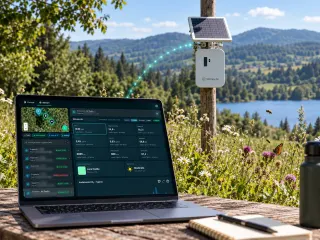


EIA · EIS · Appropriate Assessment · Monitoring
Environmental impact assessment software and studies
In Italy a state EIA takes a median of 2.7 years, and 21 in 100 end with a negative opinion.
The platform prepares the data of the study: 150+ map layers on your site, field records from the Biodiversa app and a report builder. An expert interprets it and signs: one of our team, or the consultant we support.
- 2,977projects in the MASE catalogue
- 632EIAs concluded with a known outcome
- 35EIA screenings concluded with a known outcome
Measured on 19 October 2026, MASE catalogue
EIA software
What the platform does for whoever prepares an EIA.
The study is generated with the platform and signed by an expert: one of our team when we prepare it, or the consultant who leads the EIA, whom we support and do not replace.
- 01
Data layers on your site
150+ map layers (satellite, official maps and models), computed on the perimeter of the site. Every map comes with its source, date and legend.
How the maps are made - 02
Field data
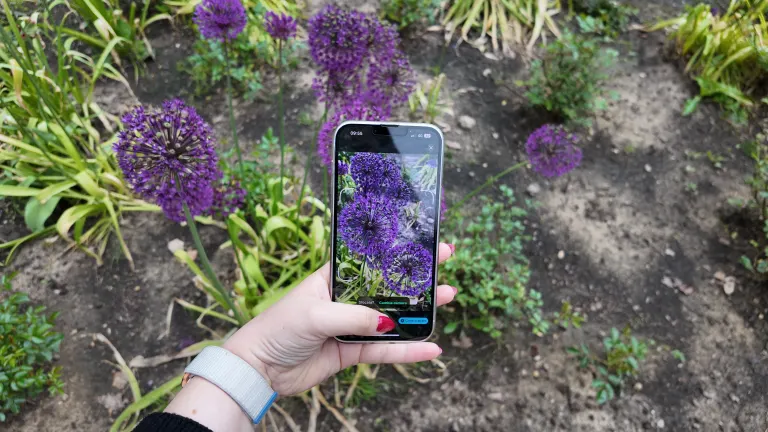
The Biodiversa app guides the survey and sends every record, with its photo and position, straight into the report. The expert validates the species.
In the field with Biodiversa - 03
Report Builder
The study starts from an EIA template: maps, indicators and tables from the platform land in their sections, and the expert works out the rest on the same data.
Who interprets and signs - 04
The report on this page
Real pages of an environmental impact study generated with the platform, each marked with what was measured automatically and what the expert worked out.
Browse the report
EIA in numbers
How long it really takes, and how it ends.
From the "Projects and authorisations" catalogue built on the Environmental Assessments portal of MASE, the Italian Ministry of the Environment. Concluded procedures only: the green bar is the middle half of the cases, the line is the median.
- Middle half (p25-p75)
- Median
- Mean
EIA
PNIEC-PNRR regime552 concluded
990 days2.7 years760-1,222 · mean 988
Ordinary regime98 concluded
1,087 days3.0 years829-1,375 · mean 1,176
PUA
PNIEC-PNRR regime48 concluded
1,191 days3.3 years1,010-1,383 · mean 1,178
Ordinary regime20 concluded
1,330 days3.6 years1,075-1,590 · mean 1,370
EIA screening
Ordinary regime24 concluded
287 days0.8 years178-400 · mean 302
PNIEC-PNRR regime13 concluded
251 days0.7 years230-294 · mean 252
Outcomes of concluded EIAs
632 procedures with a known outcome
- Positive with conditions
- Negative
- Positive without conditions
Outcomes of EIA screenings
35 procedures with a known outcome
- Excluded from the EIA
- Referred to an EIA
- Other outcomes
- About 9 months to learn whether an EIA is neededThe median ordinary screening takes 287 days, the PNIEC-PNRR one 251. 63 screenings in 100 end with the project excluded from the EIA.
- 3.0 years for an ordinary EIAMedian 1,087 days, and one case in four takes longer than 1,375 days. Under the PNIEC-PNRR regime the median is 990 days.
- 71 EIAs in 100 come with conditionsThey are obligations to meet after the decree, often monitoring ones. More on that below.
Groups with fewer than 10 procedures are not shown.Explore every project
The report, page by page
The EIA, section by section.
The pages are real: they come from an environmental impact study generated with the platform from the EIA template for agrivoltaic plants, ordinary procedure, on a client's real project. The project's name and municipality are blurred in the header. We chose the sections that are complete, without the parts that belong to the proponent. For each section: what the authority asks, how we produce it and how much of it is automatic.
Environmental impact study generated with the platform from the EIA template for agrivoltaic plants, ordinary procedure, a client's real project, name and municipality blurred · 126 pages, PDF not public
How much is automated
- Measured automatically
- Worked out by the expert on our data
- With a specialist partner
29 sections out of 30 measured automatically, 1 worked out by the expert on our data, 0 from the proponent or with a partner. Either way, an expert signs the document.
The study01 / 30
The site in numbers
- Measured automatically
What the authority asks for
The technical summary that goes with the application: what it describes, on which perimeter, with which data and methods.
How we produce it
The platform measures the project perimeter and opens with it: 65.44 hectares, 97.3 per cent agricultural use, 48.7 soil sealing, and the natural cover.
Interpreted and signed by Team expert, on the platform's data
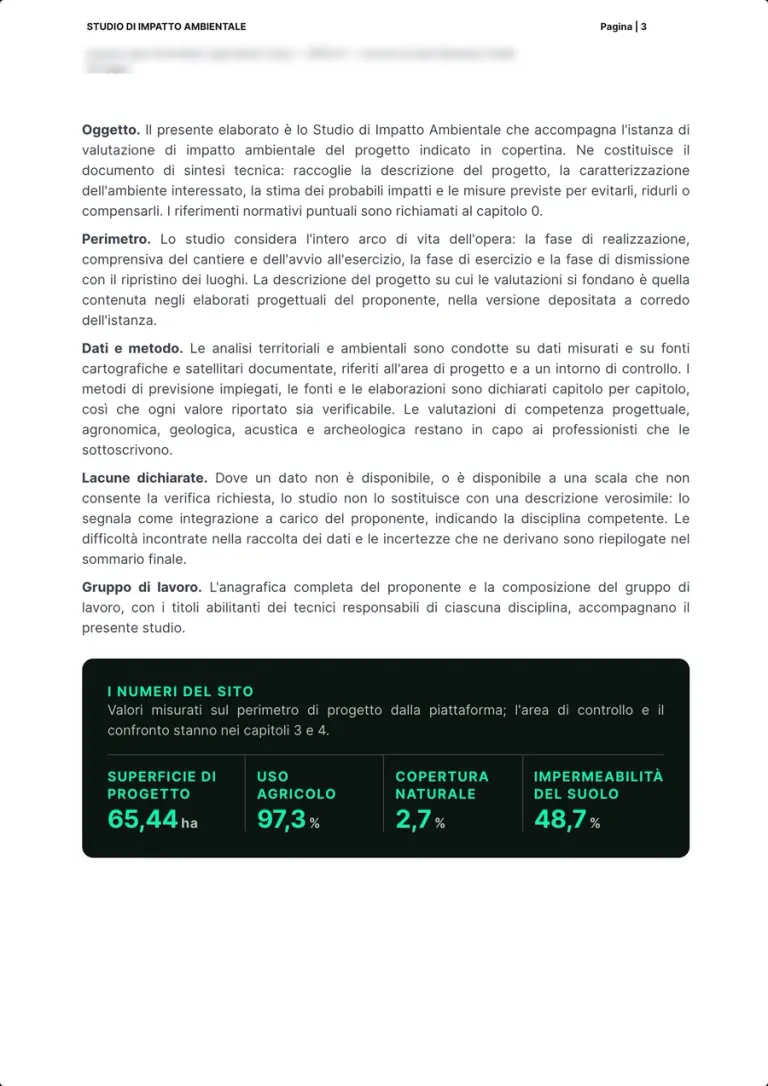
Real page · EIA generated with the platform · p. 3/126 The study02 / 30
Method and structure of the study
- Worked out by the expert on our data
What the authority asks for
The study follows the points of Annex VII to Part Two of Italian Legislative Decree 152/2006, from the project to monitoring.
How we produce it
Chapter 0 says how it is built: data collection, baseline, impact assessment, mitigation and monitoring, and the legal framework.
Interpreted and signed by Team expert
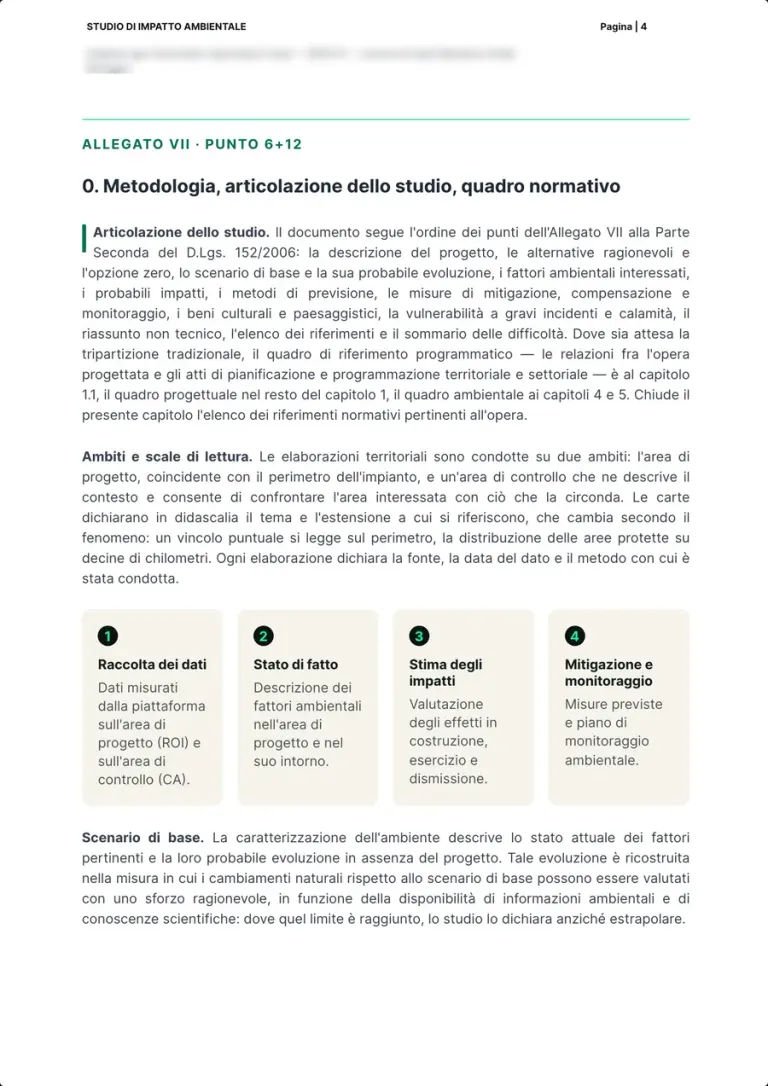
Real page · EIA generated with the platform · p. 4/126 The study03 / 30
Project area and control area
- Measured automatically
What the authority asks for
Frame the project in its surroundings, with a benchmark for every measured value.
How we produce it
On a Sentinel-2 orthophoto, the project perimeter where the site values are measured, inside a control area 5 km wide that serves as comparison.
Interpreted and signed by Platform
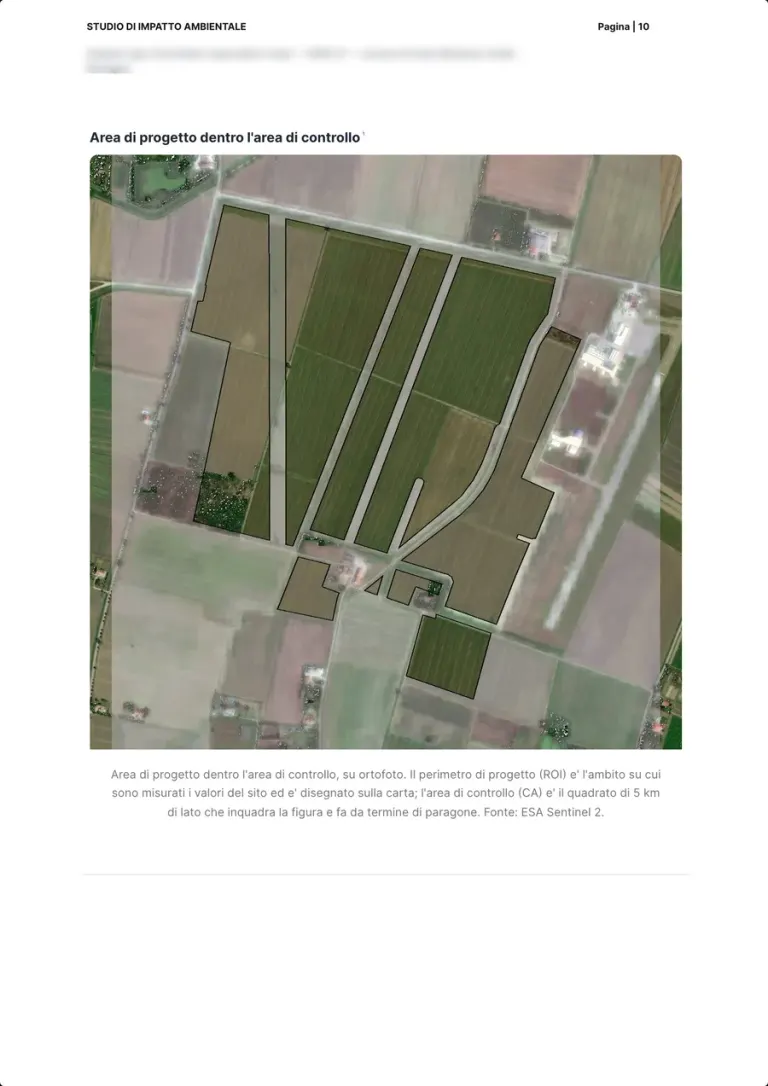
Real page · EIA generated with the platform · p. 10/126 Protected areas and constraints04 / 30
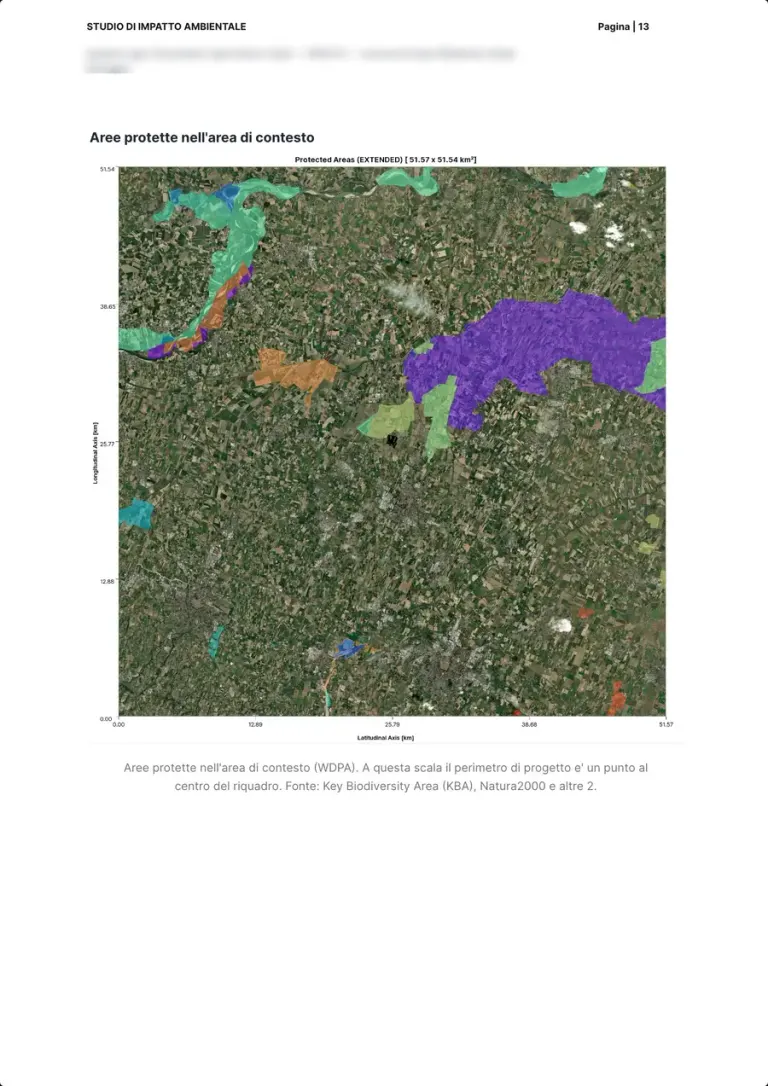
Protected areas in the wider context
- Measured automatically
What the authority asks for
The project's relationship with protected areas: which ones are around and how far.
How we produce it
The map of protected areas over a wide context area, at the scale where the project is a point at the centre, from Key Biodiversity Areas, the Natura 2000 network and other databases.
Interpreted and signed by Platform
Real page · EIA generated with the platform · p. 13/126 Protected areas and constraints05 / 30
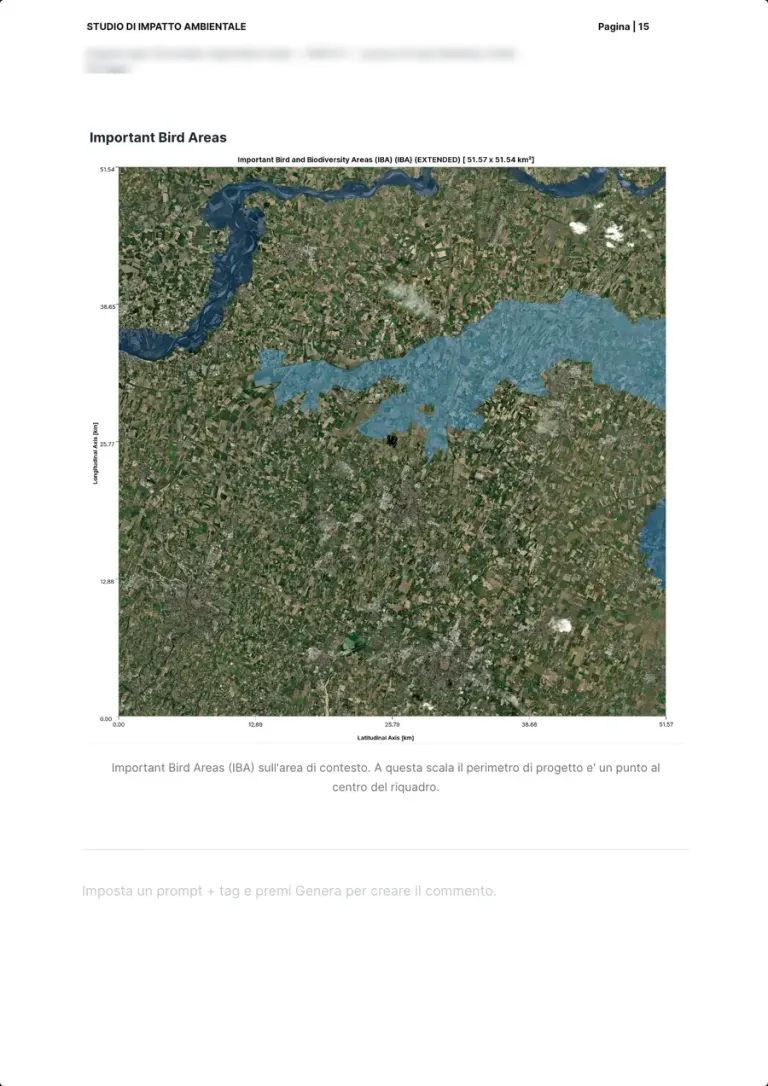
Important Bird Areas
- Measured automatically
What the authority asks for
The areas that matter for birds, to consider for the effects on birds and migration.
How we produce it
The Important Bird and Biodiversity Areas over the same context area, at the same scale as the protected areas, for a direct comparison.
Interpreted and signed by Platform
Real page · EIA generated with the platform · p. 15/126 Protected areas and constraints06 / 30
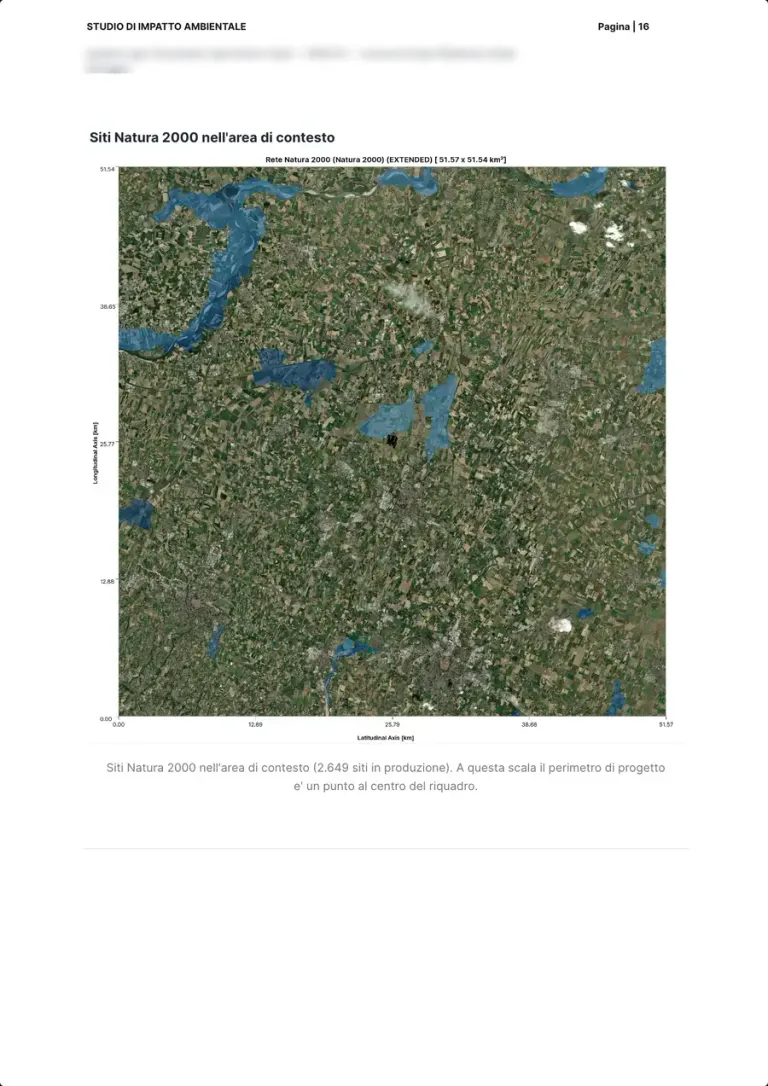
Natura 2000 sites
- Measured automatically
- Worked out by the expert on our data
What the authority asks for
Whether Natura 2000 sites are present and an appropriate assessment is needed.
How we produce it
The Natura 2000 sites of the context area, from the network's database; the appropriate assessment, if needed, stays with the expert.
Interpreted and signed by Team expert, on the platform's data
Real page · EIA generated with the platform · p. 16/126 Protected areas and constraints07 / 30
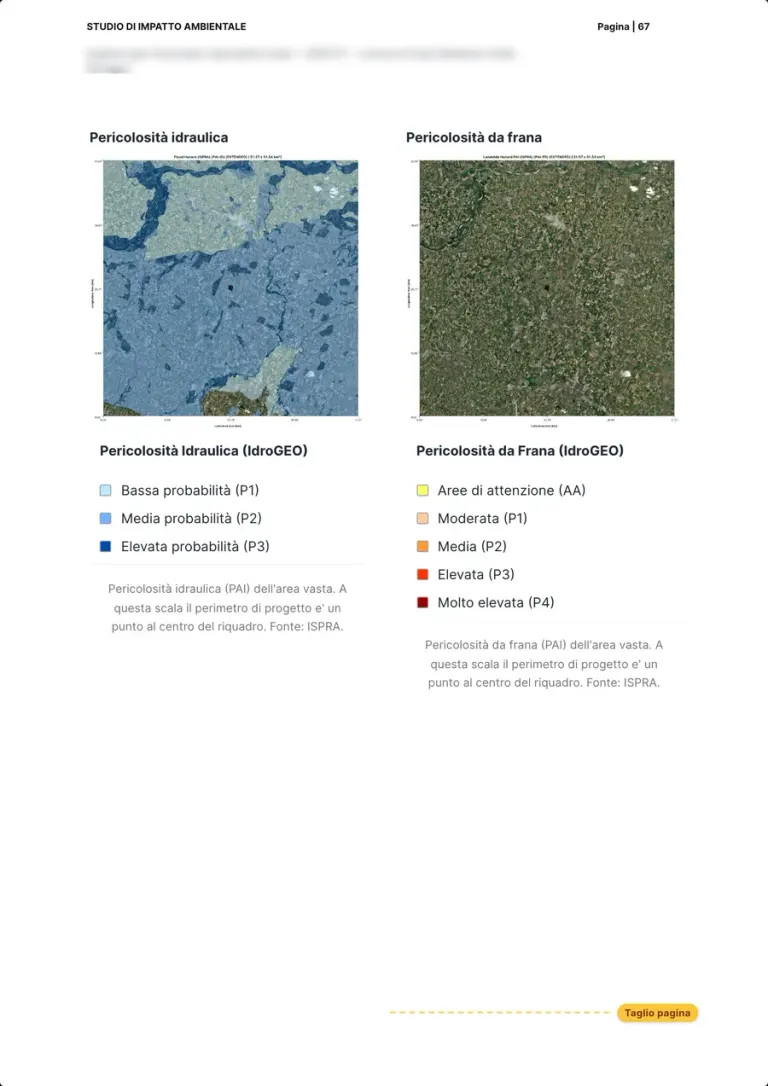
Flood and landslide hazard
- Measured automatically
What the authority asks for
The relationship with the hydrogeological plans: which flood and landslide hazard classes the area falls in.
How we produce it
The two ISPRA IdroGEO maps side by side, flood and landslide hazard, with their classes; checking compatibility with the plan stays with the expert.
Interpreted and signed by Team expert, on the platform's data
Real page · EIA generated with the platform · p. 67/126 Biodiversity08 / 30
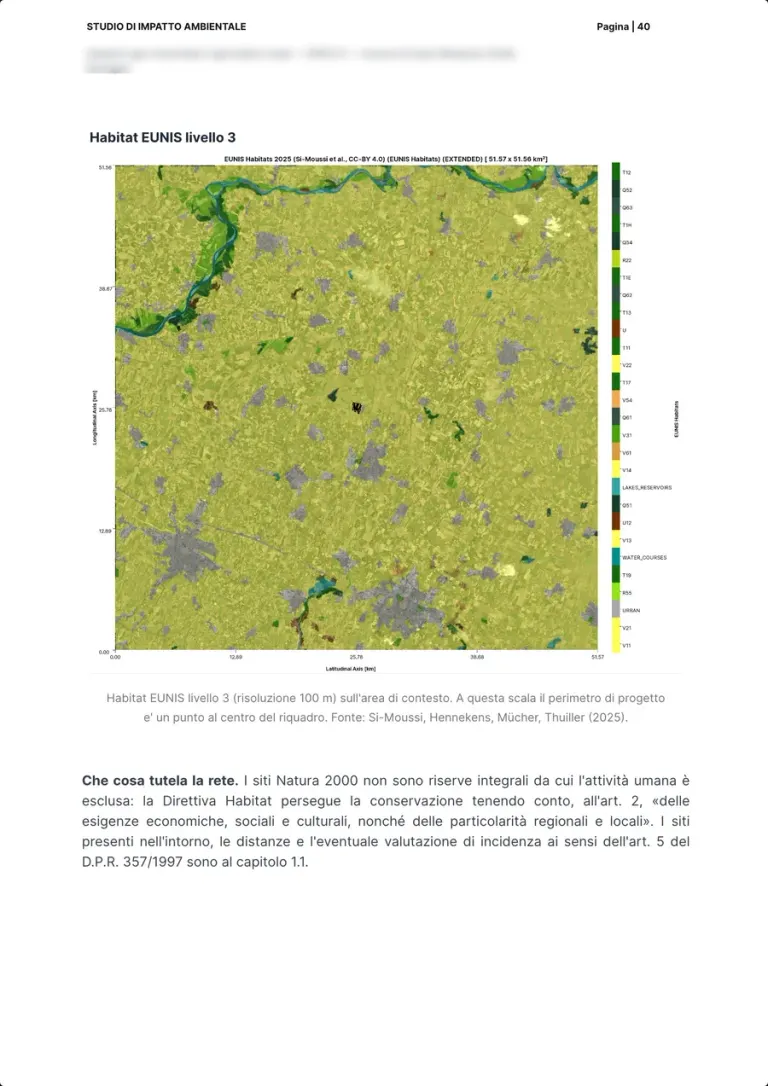
EUNIS habitats
- Measured automatically
What the authority asks for
The vegetation, flora and habitats affected by the project and its surroundings.
How we produce it
The EUNIS level 3 habitat map, at 100 metre resolution, over the context area; the botanical survey in the field completes it.
Interpreted and signed by Platform
Real page · EIA generated with the platform · p. 40/126 Biodiversity09 / 30
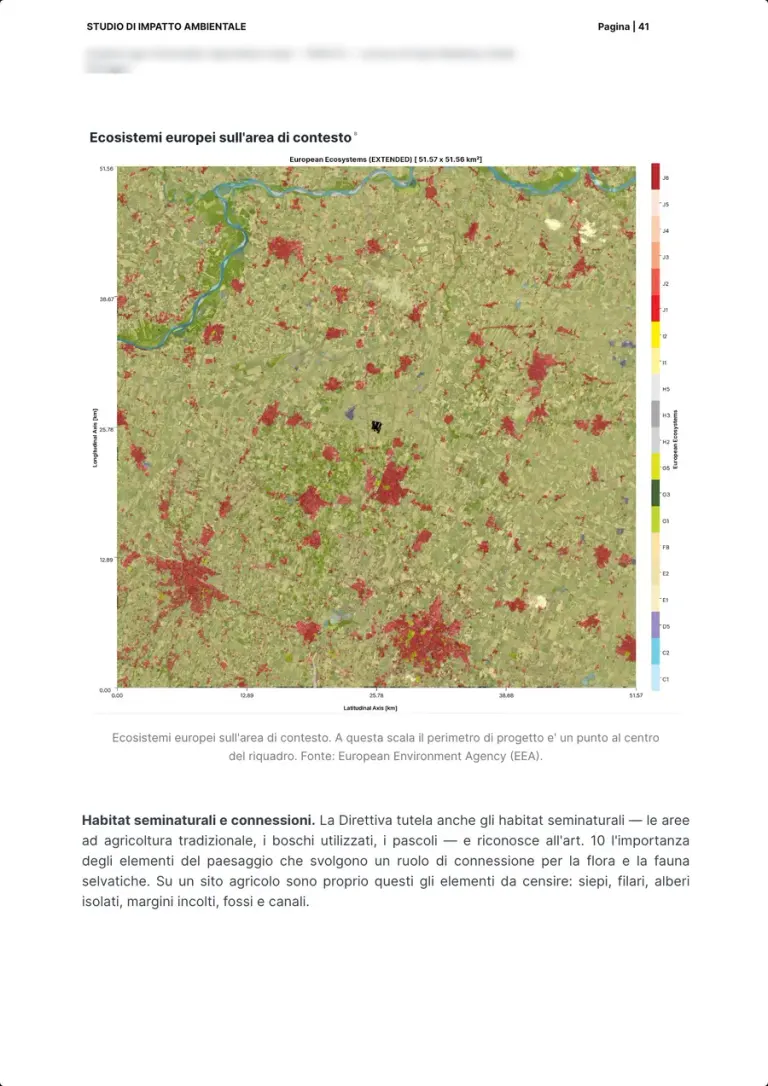
European ecosystems
- Measured automatically
What the authority asks for
The ecosystems present and their continuity, including the semi-natural habitats of farmland.
How we produce it
The European Environment Agency ecosystem map over the context area, read together with the landscape features that act as connections.
Interpreted and signed by Platform
Real page · EIA generated with the platform · p. 41/126 Biodiversity10 / 30
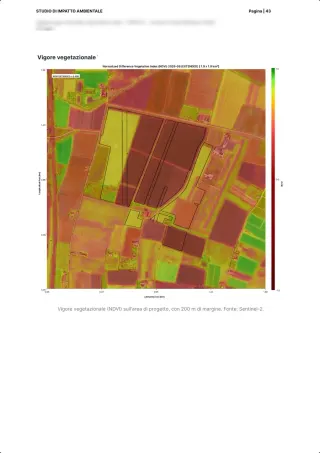
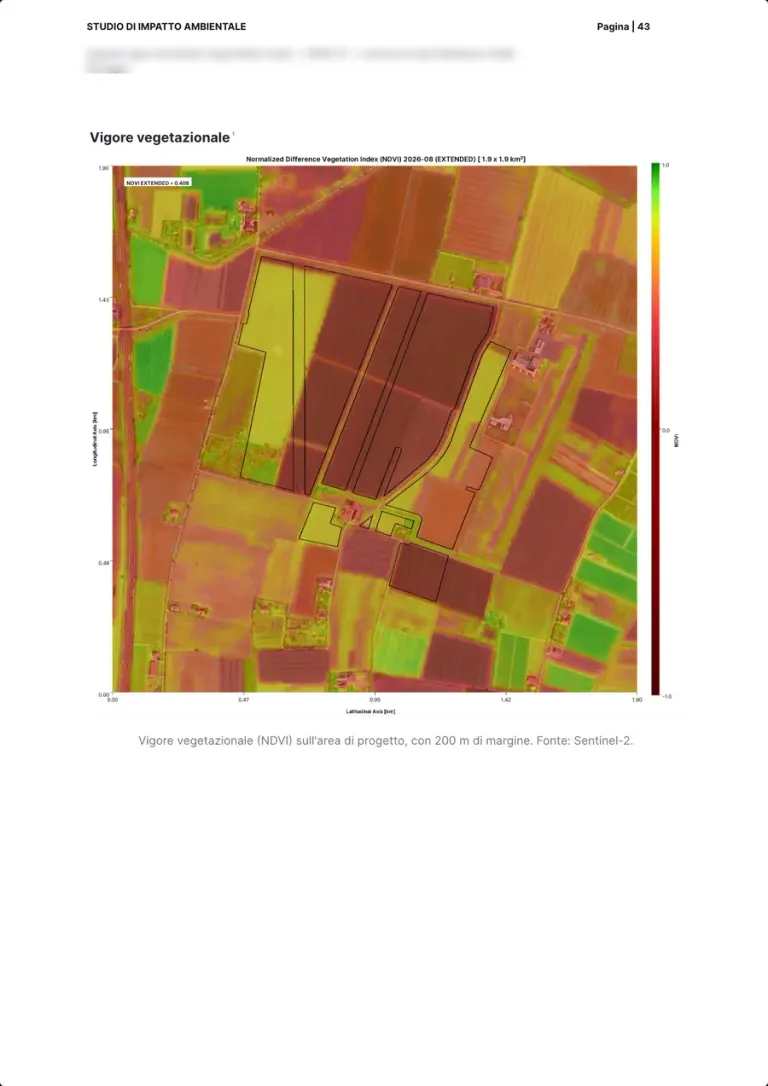
Vegetation vigour
- Measured automatically
What the authority asks for
The state of vegetation on the project area before the works.
How we produce it
The Sentinel-2 NDVI index over the project area with a 200 metre margin: the baseline to measure, survey after survey, what changes.
Interpreted and signed by Platform
Real page · EIA generated with the platform · p. 43/126 Biodiversity11 / 30
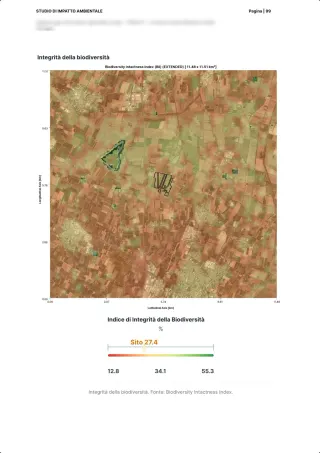
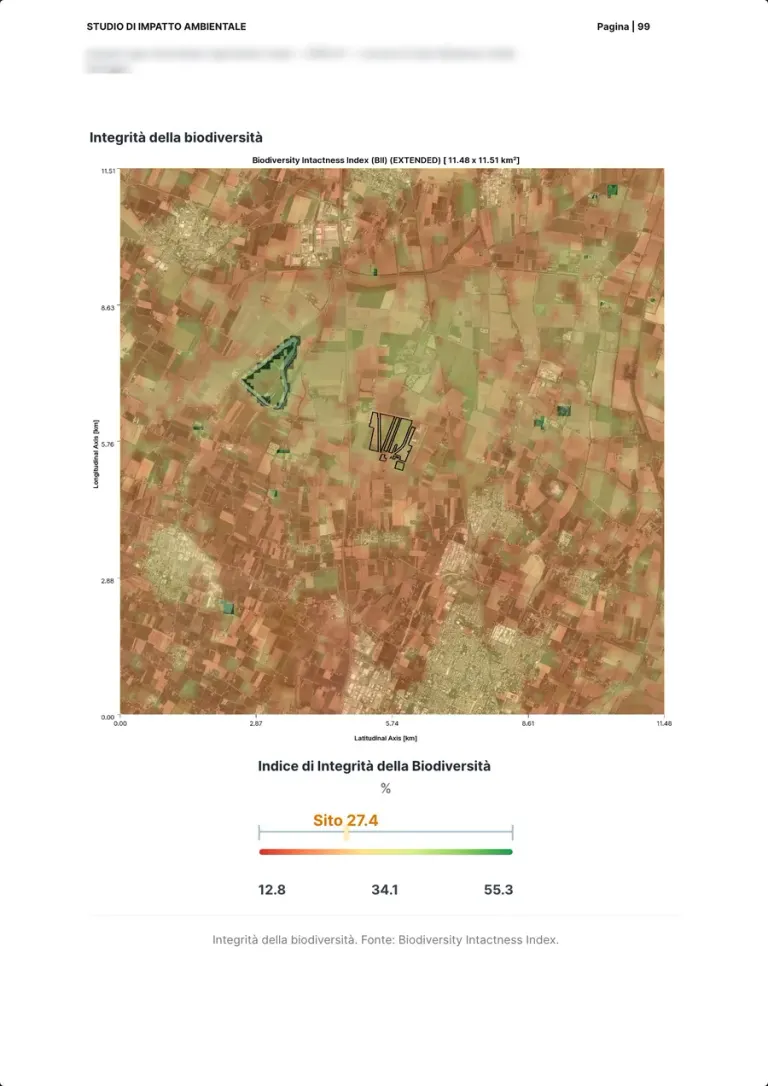
Biodiversity intactness
- Measured automatically
What the authority asks for
The state of biodiversity in the area, as the benchmark for the project's effects.
How we produce it
The Biodiversity Intactness Index, with the site value at 27.4 per cent on the scale of the surroundings.
Interpreted and signed by Platform
Real page · EIA generated with the platform · p. 99/126 Soil12 / 30
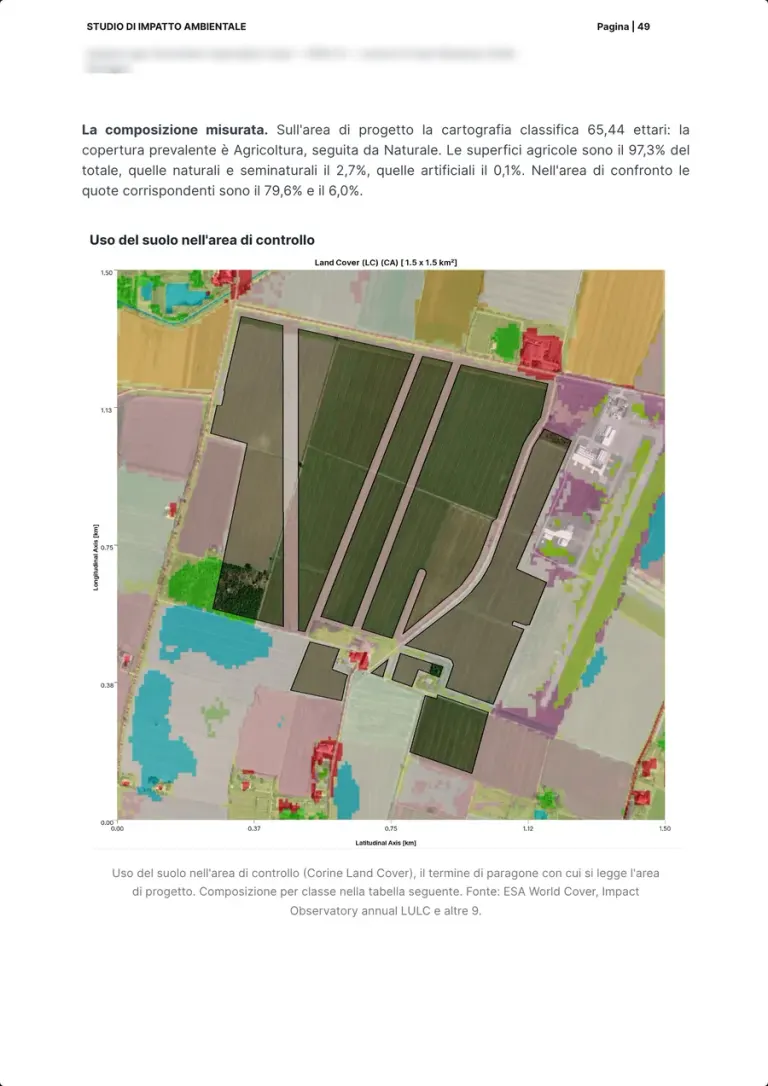
Land use
- Measured automatically
What the authority asks for
How much of the area is agricultural, natural or artificial, and how it compares with the context.
How we produce it
On the project perimeter 97.3 per cent agricultural and 0.1 artificial, the rest natural and semi-natural; in the comparison area 79.6 agricultural and 6.0 natural per cent. Sources: ESA WorldCover and Corine Land Cover.
Interpreted and signed by Platform
Real page · EIA generated with the platform · p. 49/126 Soil13 / 30
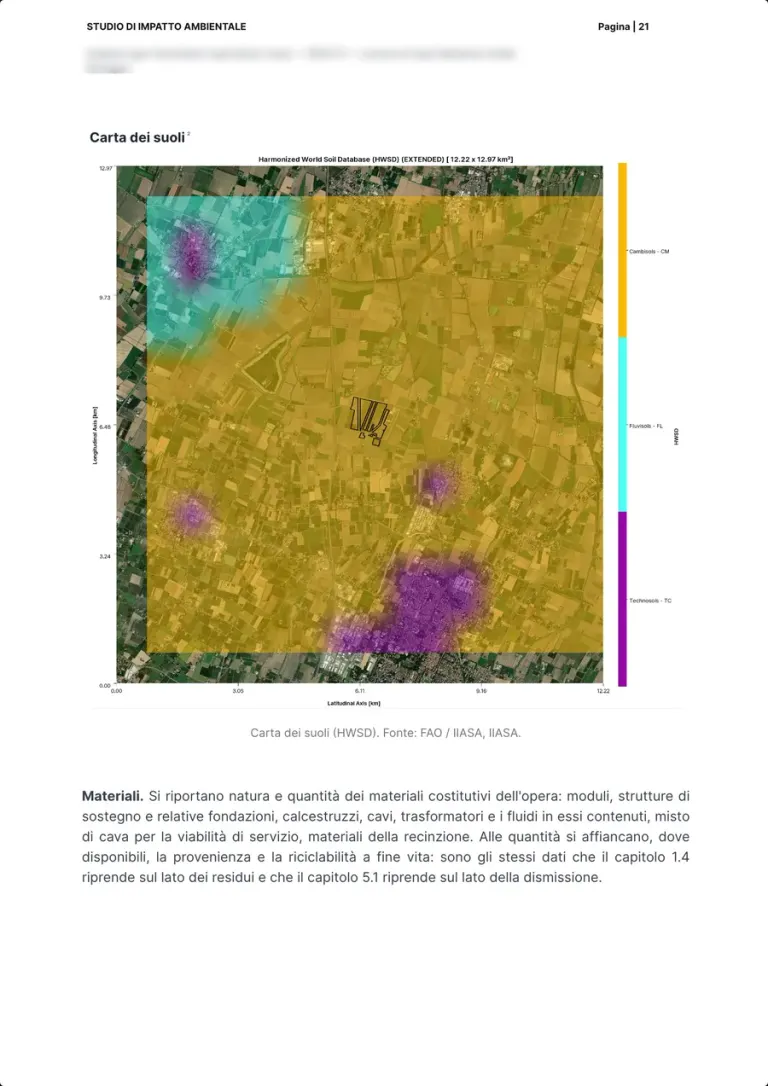
Soil map
- Measured automatically
What the authority asks for
The soil types affected and their land capability.
How we produce it
The soil map of the Harmonized World Soil Database (FAO, IIASA) over the wider area, with the classes present in the legend.
Interpreted and signed by Platform
Real page · EIA generated with the platform · p. 21/126 Soil14 / 30
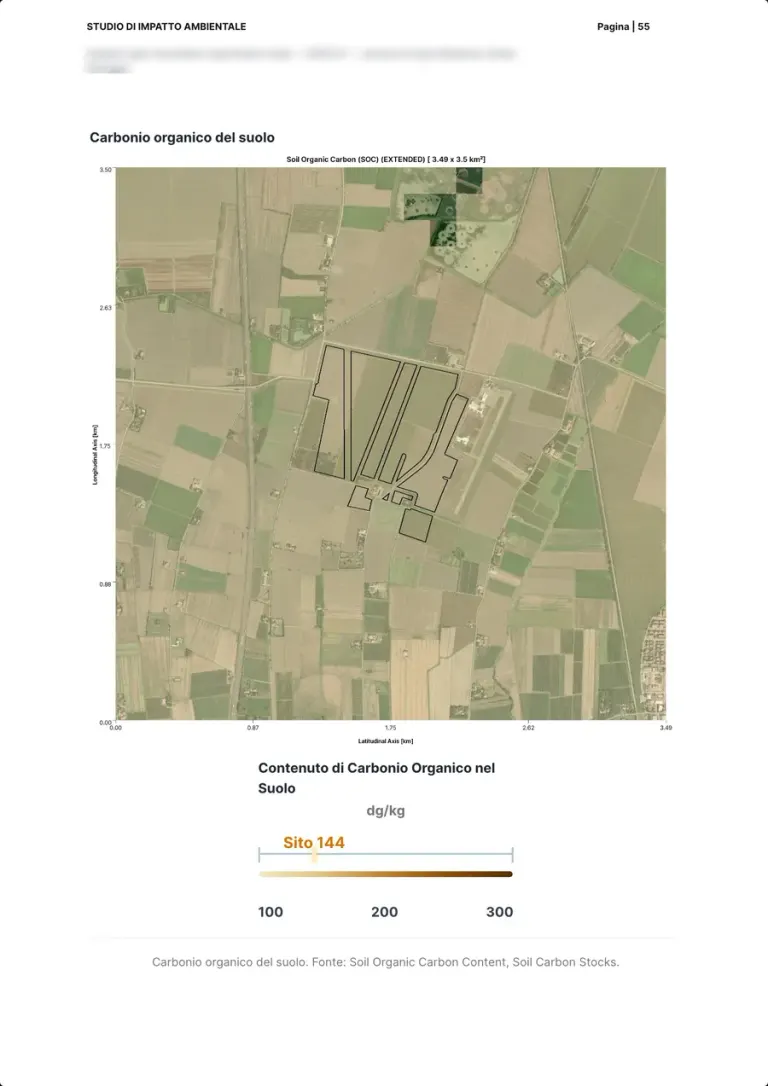
Soil organic carbon
- Measured automatically
What the authority asks for
Soil quality and its role as a carbon store, to be preserved during operation.
How we produce it
The soil organic carbon content map, with the site value at 144 dg/kg on the scale of the surroundings.
Interpreted and signed by Platform
Real page · EIA generated with the platform · p. 55/126 Soil15 / 30
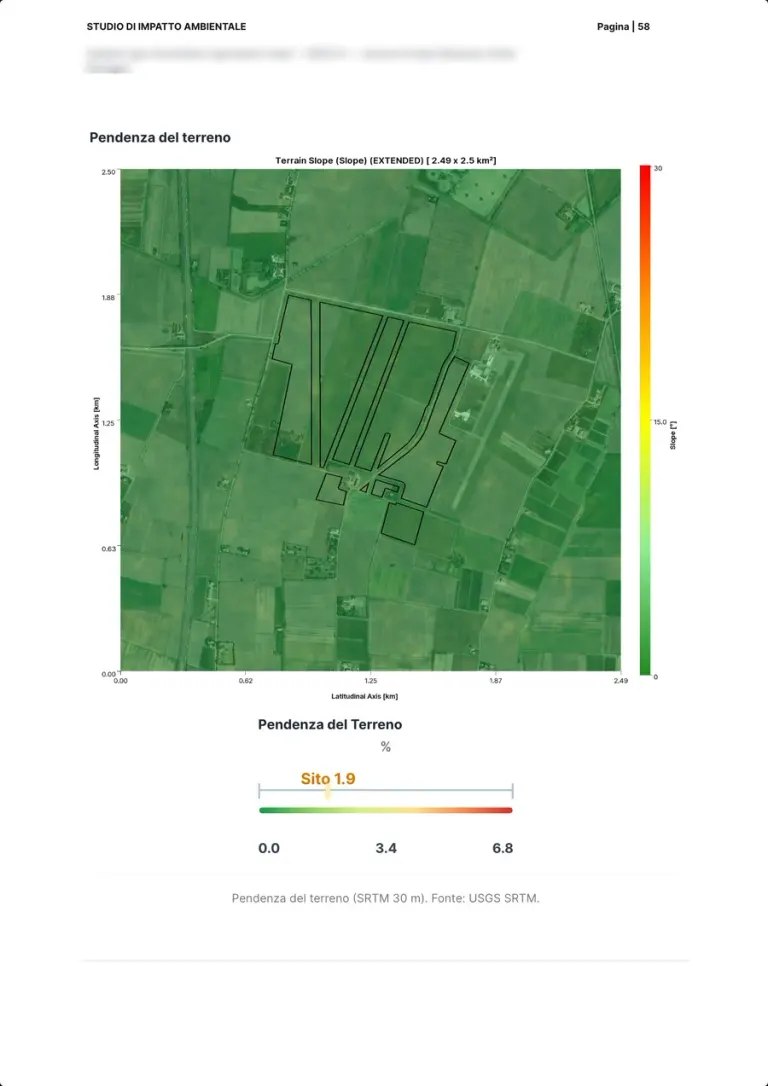
Terrain slope
- Measured automatically
What the authority asks for
The site's morphology, which matters for stability, runoff and installing the structures.
How we produce it
Slope from the 30 metre SRTM model, with the site value at 1.9 per cent: flat land.
Interpreted and signed by Platform
Real page · EIA generated with the platform · p. 58/126 Water16 / 30
Surface water bodies
- Measured automatically
What the authority asks for
The water bodies near the project and the possible effects on surface water.
How we produce it
The surface water bodies around the site, from OpenStreetMap and the marine and coastal databases.
Interpreted and signed by Platform
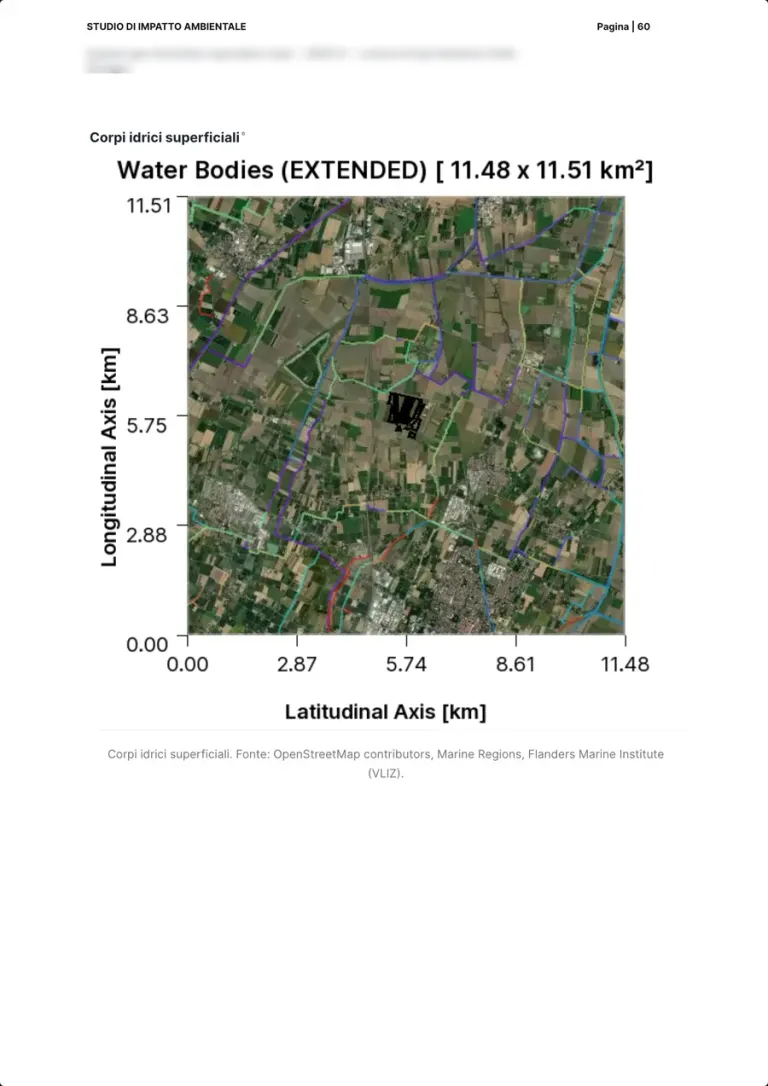
Real page · EIA generated with the platform · p. 60/126 Water17 / 30
River network
- Measured automatically
What the authority asks for
The river network and the state of water bodies under Part Three of Legislative Decree 152/2006.
How we produce it
The network from MERIT Hydro around the site; the ecological and chemical status of water bodies is taken from regional monitoring.
Interpreted and signed by Platform
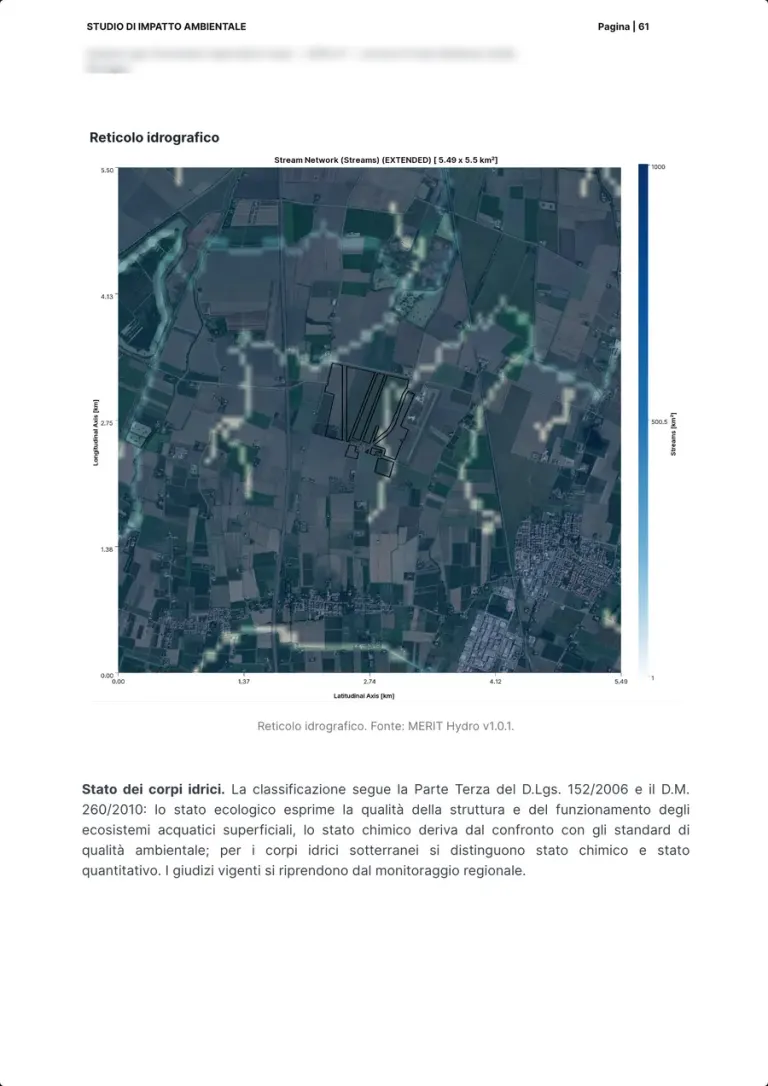
Real page · EIA generated with the platform · p. 61/126 Water18 / 30
Wetlands
- Measured automatically
What the authority asks for
The wetlands affected, sensitive habitats for flora and fauna.
How we produce it
The wetlands around the site from Lehner and Döll; the text also frames the Hydrogeological Plan and its classes.
Interpreted and signed by Platform
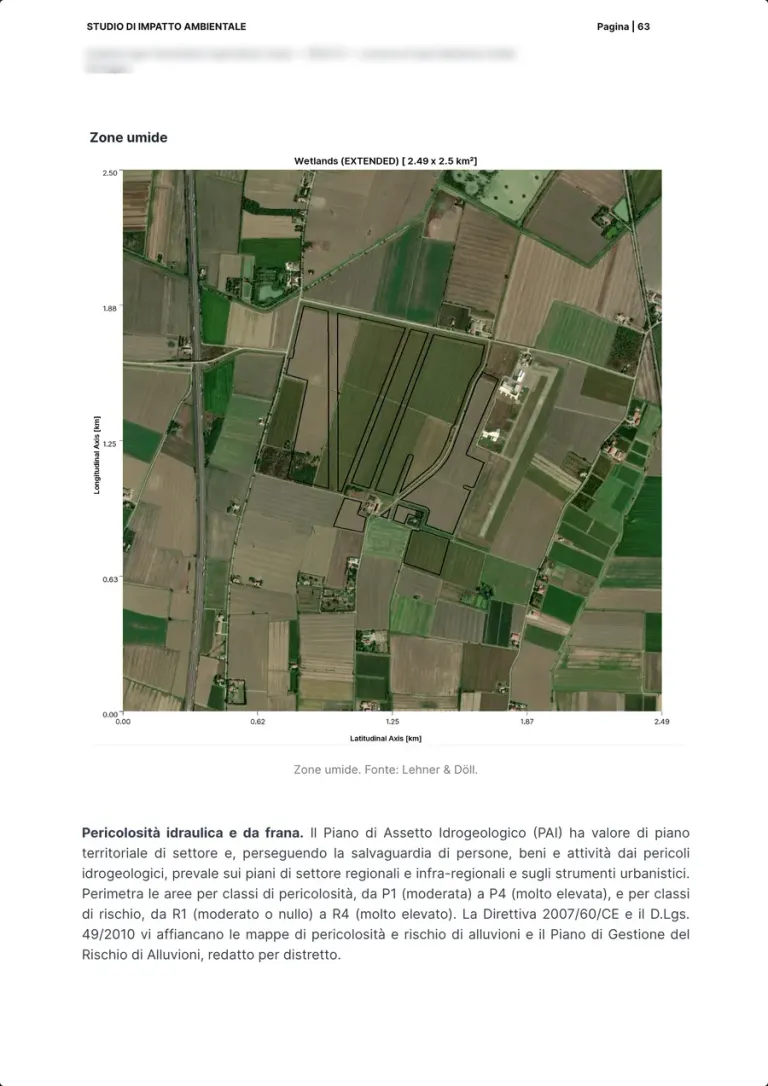
Real page · EIA generated with the platform · p. 63/126 Air and climate19 / 30
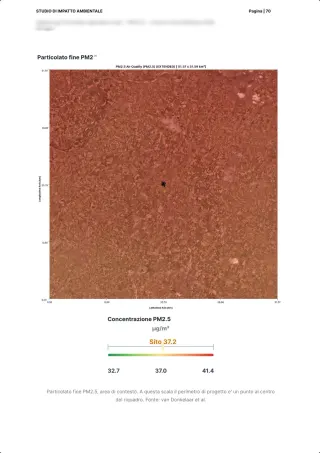
Air quality: PM2.5
- Measured automatically
What the authority asks for
Air quality before the works, to estimate the effects of construction and operation.
How we produce it
Fine particulate PM2.5 concentration over the context area, with the site value at 37.2 µg/m³ on the area's scale.
Interpreted and signed by Platform
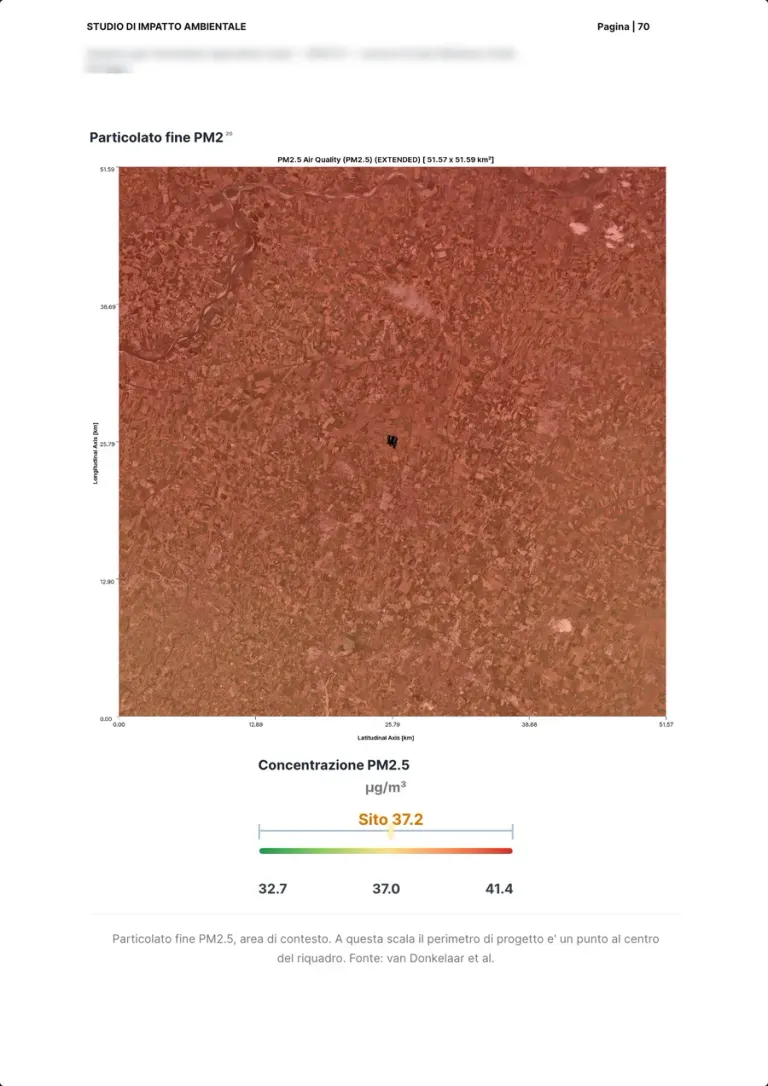
Real page · EIA generated with the platform · p. 70/126 Air and climate20 / 30
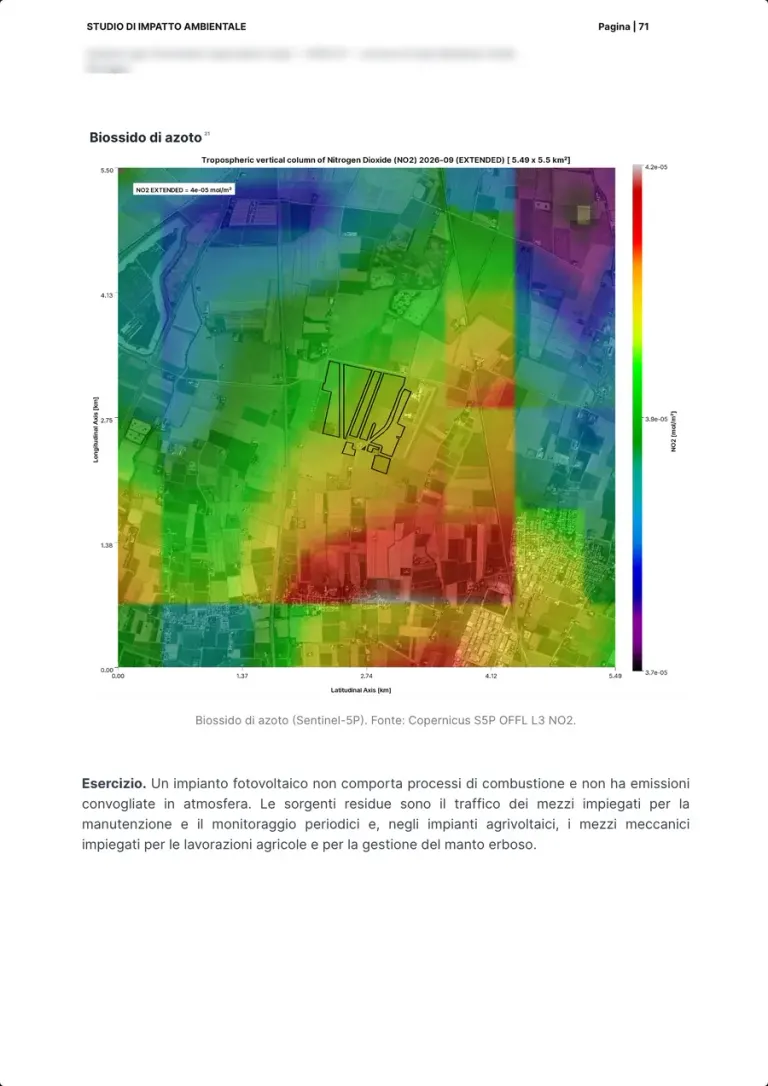
Nitrogen dioxide
- Measured automatically
What the authority asks for
The project's air emissions and the background state of pollutants.
How we produce it
Nitrogen dioxide from Sentinel-5P around the site; the text notes that a solar plant in operation has no point-source emissions.
Interpreted and signed by Platform
Real page · EIA generated with the platform · p. 71/126 Air and climate21 / 30
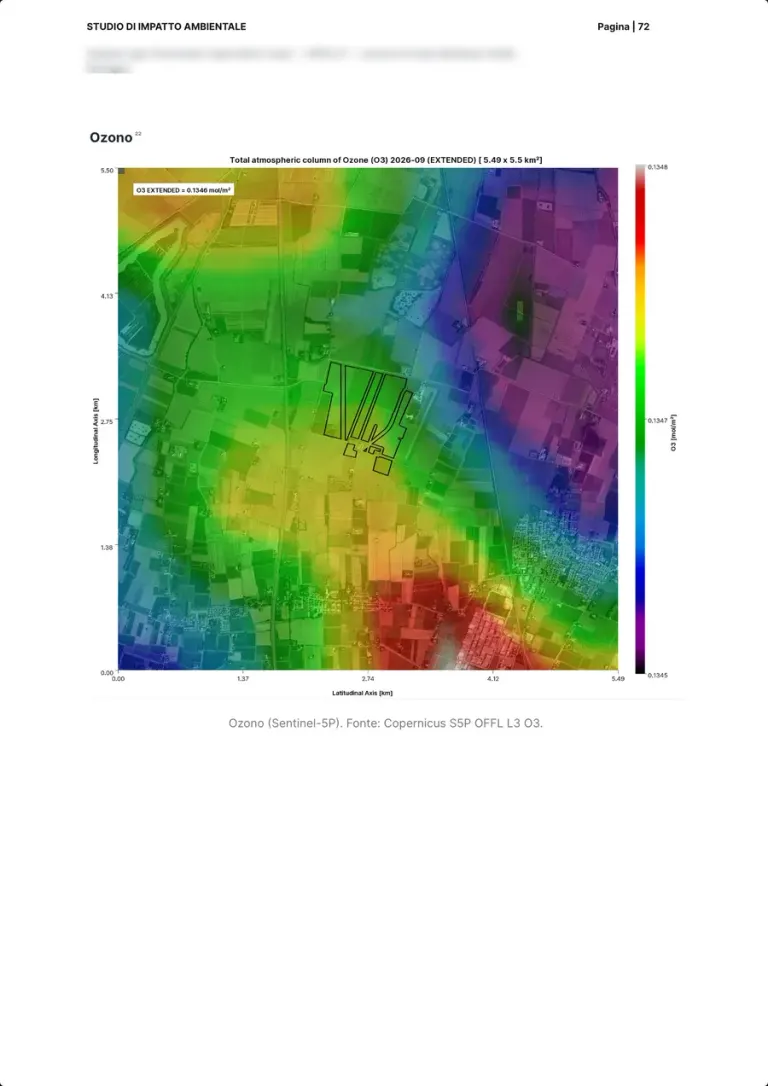
Ozone
- Measured automatically
What the authority asks for
The other background pollutants in the project area.
How we produce it
Total ozone column from Sentinel-5P around the site, at the same scale as nitrogen dioxide.
Interpreted and signed by Platform
Real page · EIA generated with the platform · p. 72/126 Air and climate22 / 30
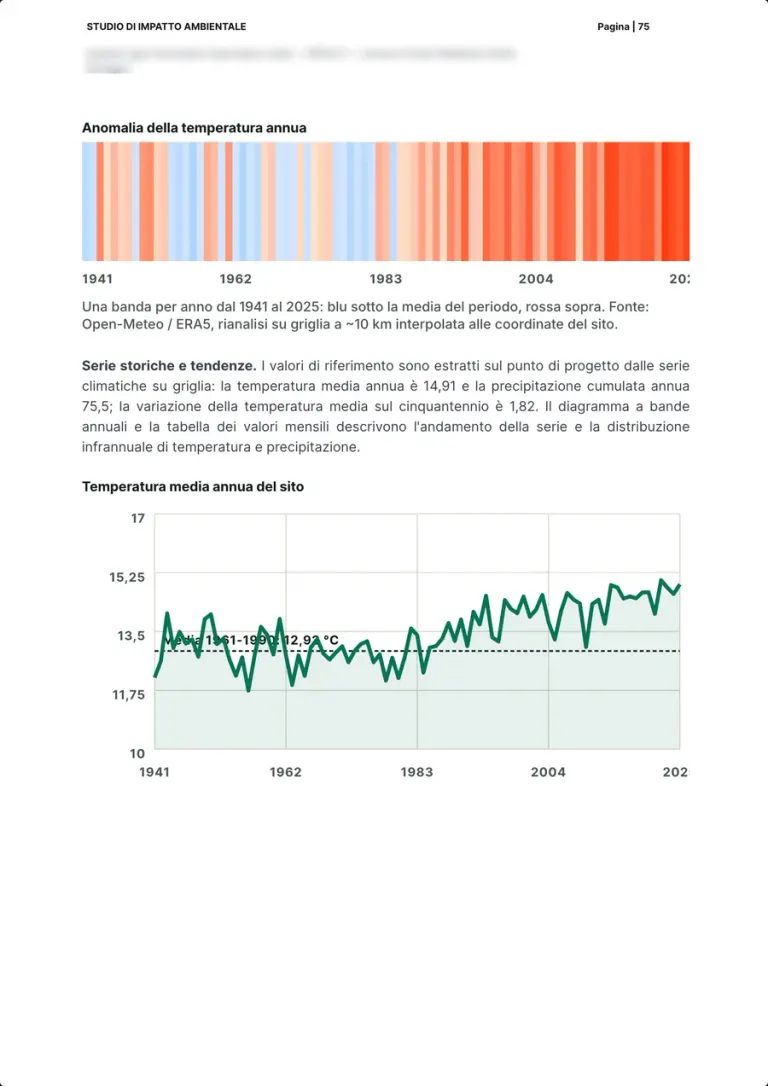
Climate: historical series
- Measured automatically
What the authority asks for
The site's climate and its evolution, for the project's vulnerability to climate change.
How we produce it
ERA5 climate series at the project point from 1941 to 2025: one band per year, mean annual temperature and precipitation, and their trend.
Interpreted and signed by Platform
Real page · EIA generated with the platform · p. 75/126 Air and climate23 / 30
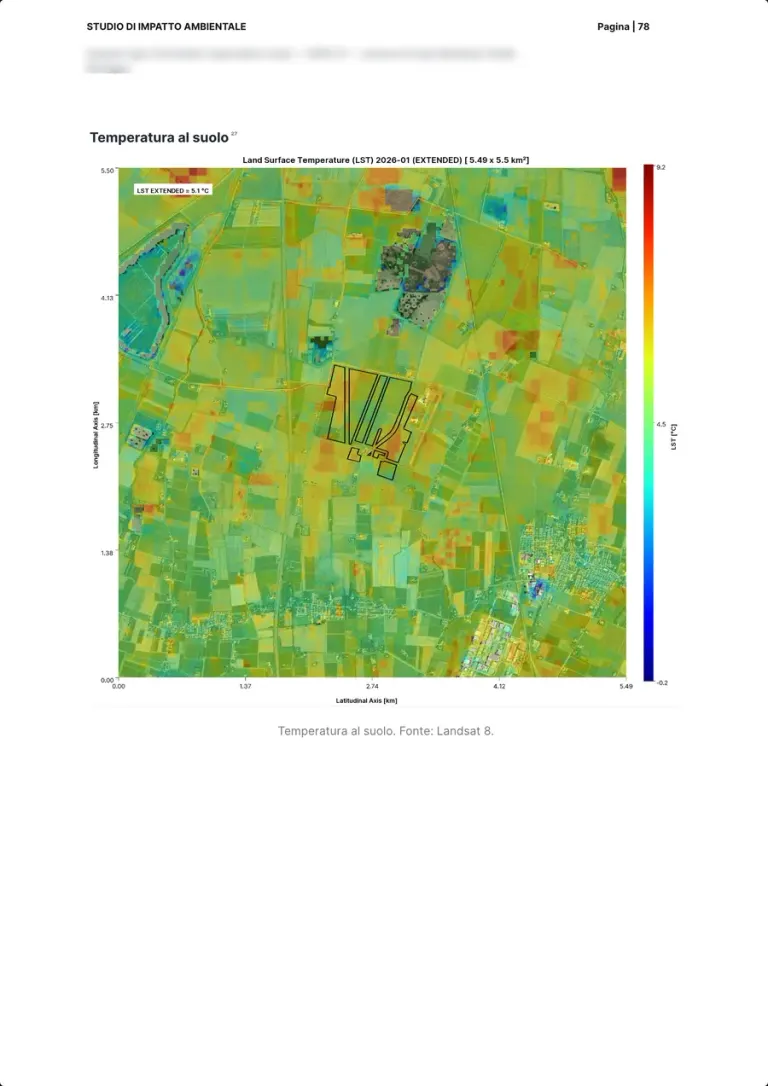
Land surface temperature
- Measured automatically
What the authority asks for
Heat islands and the thermal behaviour of surfaces before the project.
How we produce it
Land surface temperature from Landsat 8 around the site: the baseline to read the effect of the modules and the grass cover.
Interpreted and signed by Platform
Real page · EIA generated with the platform · p. 78/126 Human system and hazards24 / 30
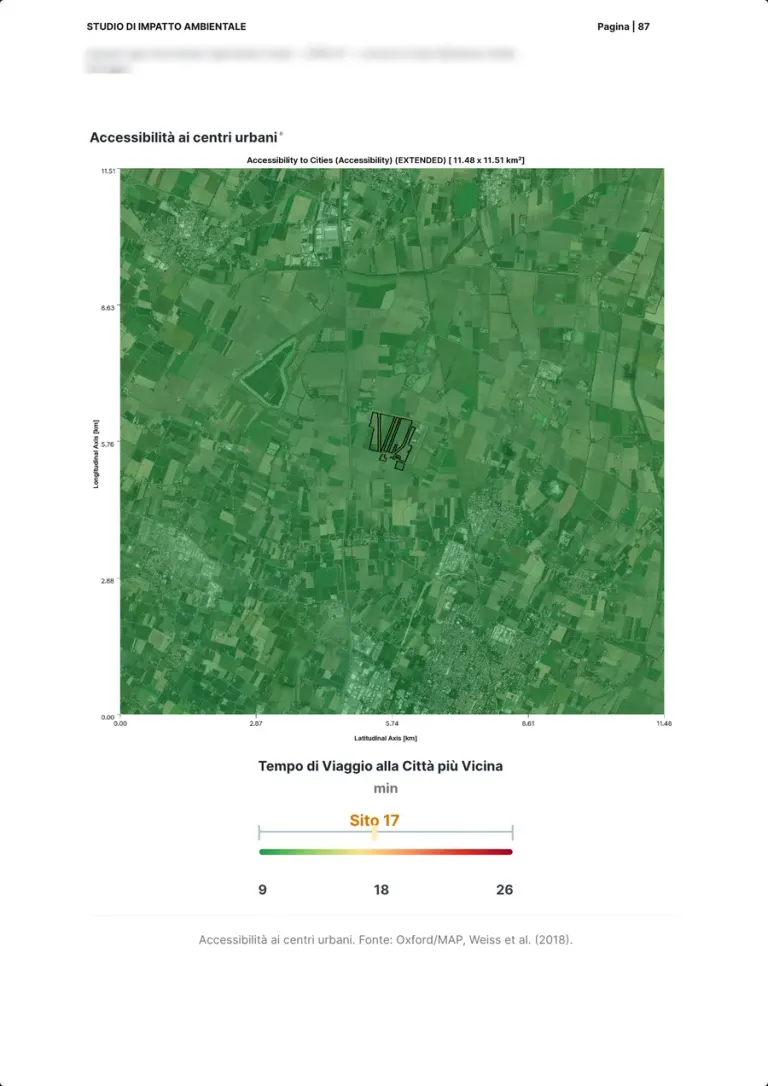
Access to cities
- Measured automatically
What the authority asks for
The settlement and infrastructure context the project fits into.
How we produce it
Travel time to the nearest city (Oxford MAP, Weiss et al. 2018), with the site value at 17 minutes.
Interpreted and signed by Platform
Real page · EIA generated with the platform · p. 87/126 Human system and hazards25 / 30
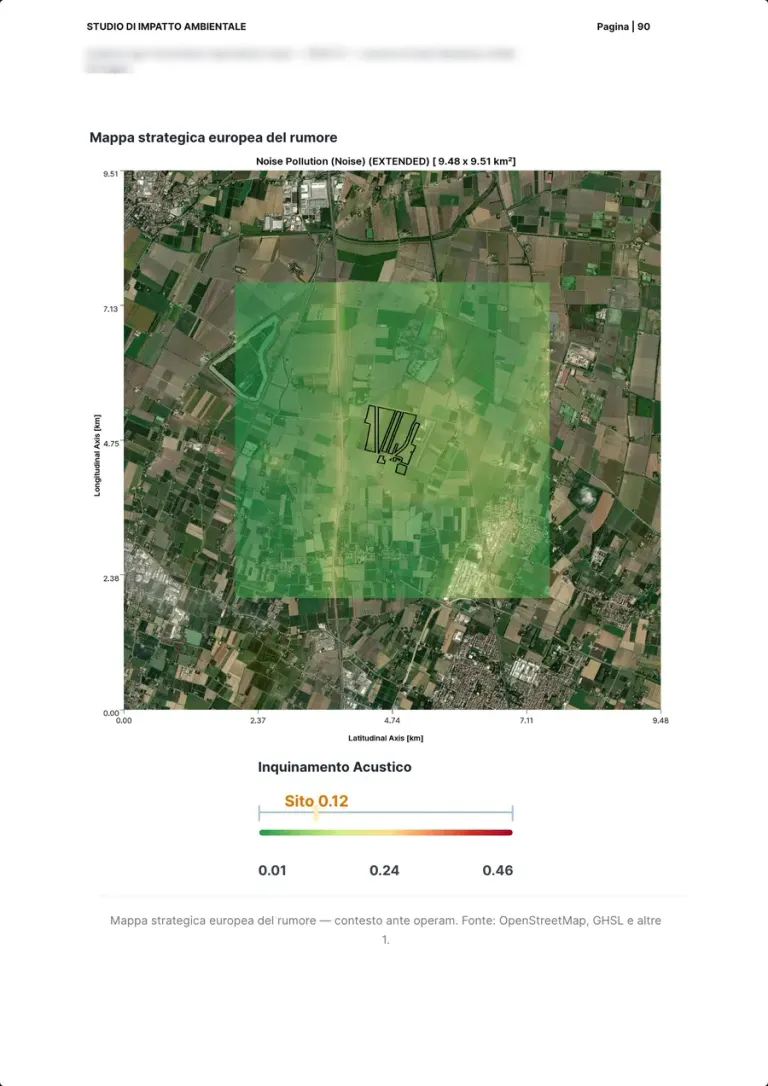
Noise before the works
- Measured automatically
- With a specialist partner
What the authority asks for
The noise climate before the project, the basis of the predictive noise impact assessment.
How we produce it
The European strategic noise map as the pre-works context, with the site value at 0.12; the predictive assessment is signed by the qualified acoustic technician.
Interpreted and signed by Qualified acoustic technician, on the platform's data
Real page · EIA generated with the platform · p. 90/126 Human system and hazards26 / 30
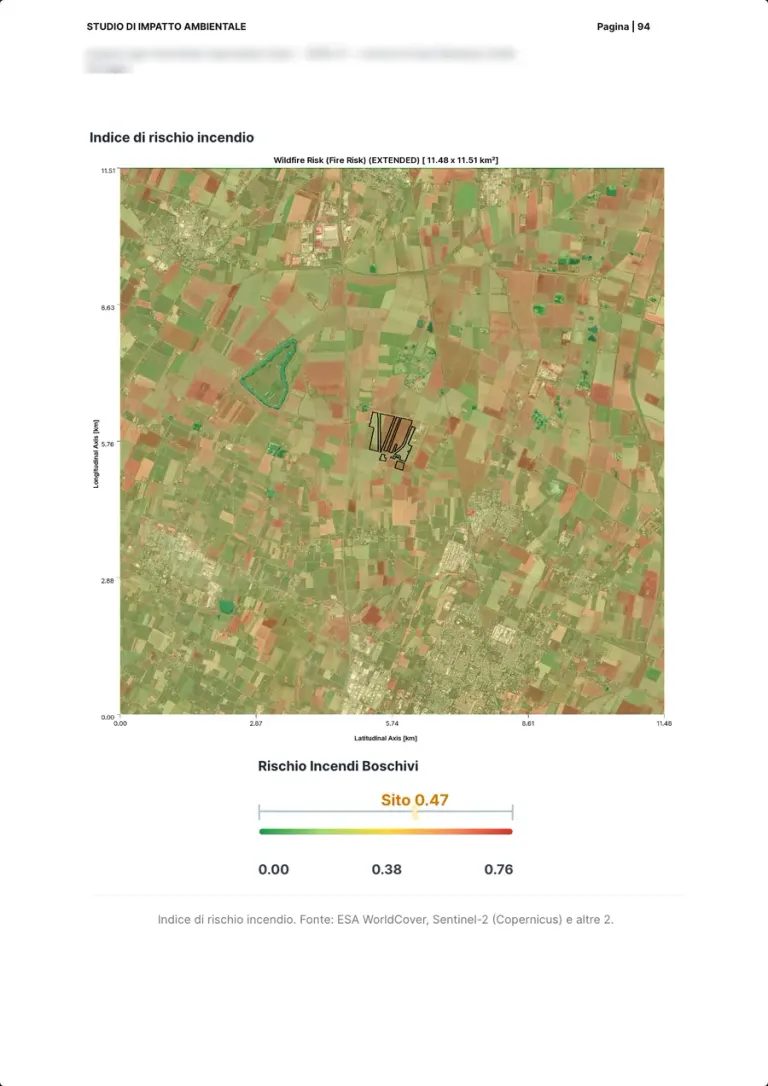
Fire risk
- Measured automatically
What the authority asks for
The project's vulnerability to accidents and disasters, fires included.
How we produce it
The fire risk index from ESA WorldCover and Sentinel-2, with the site value at 0.47 on the scale of the surroundings.
Interpreted and signed by Platform
Real page · EIA generated with the platform · p. 94/126 Human system and hazards27 / 30
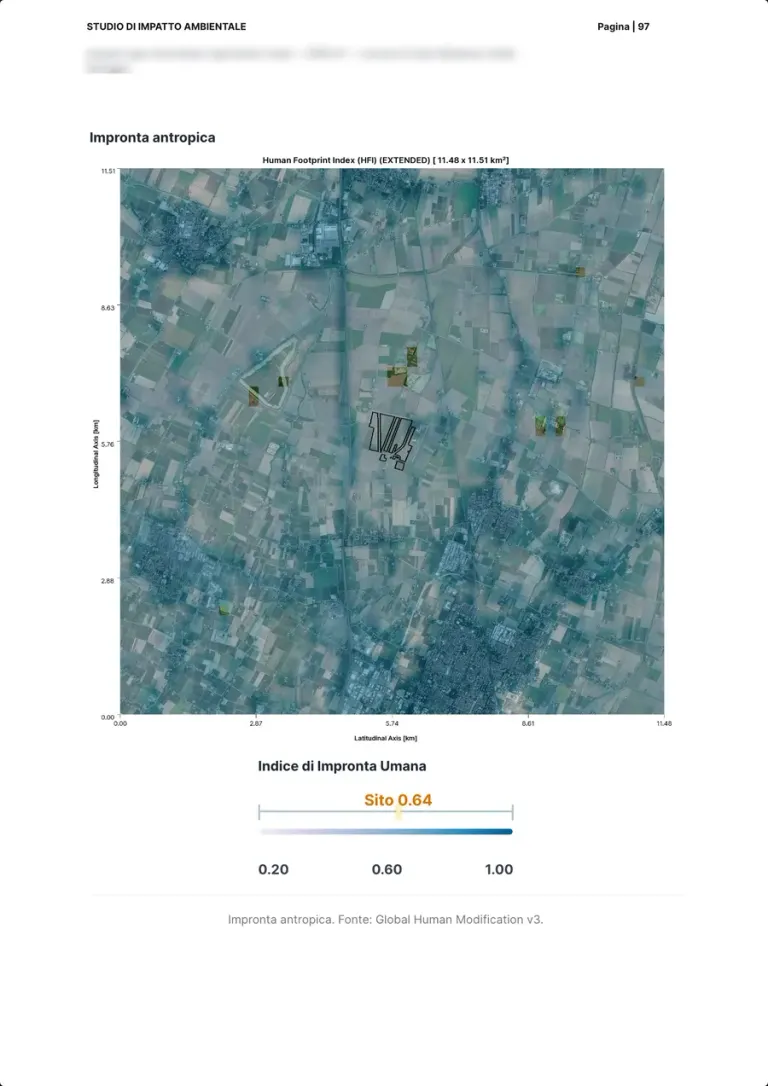
Human footprint
- Measured automatically
What the authority asks for
How much the area has been transformed by people, to read cumulative effects.
How we produce it
The Global Human Modification index, with the site value at 0.64 on the scale of the surroundings.
Interpreted and signed by Platform
Real page · EIA generated with the platform · p. 97/126 Mitigation and monitoring28 / 30
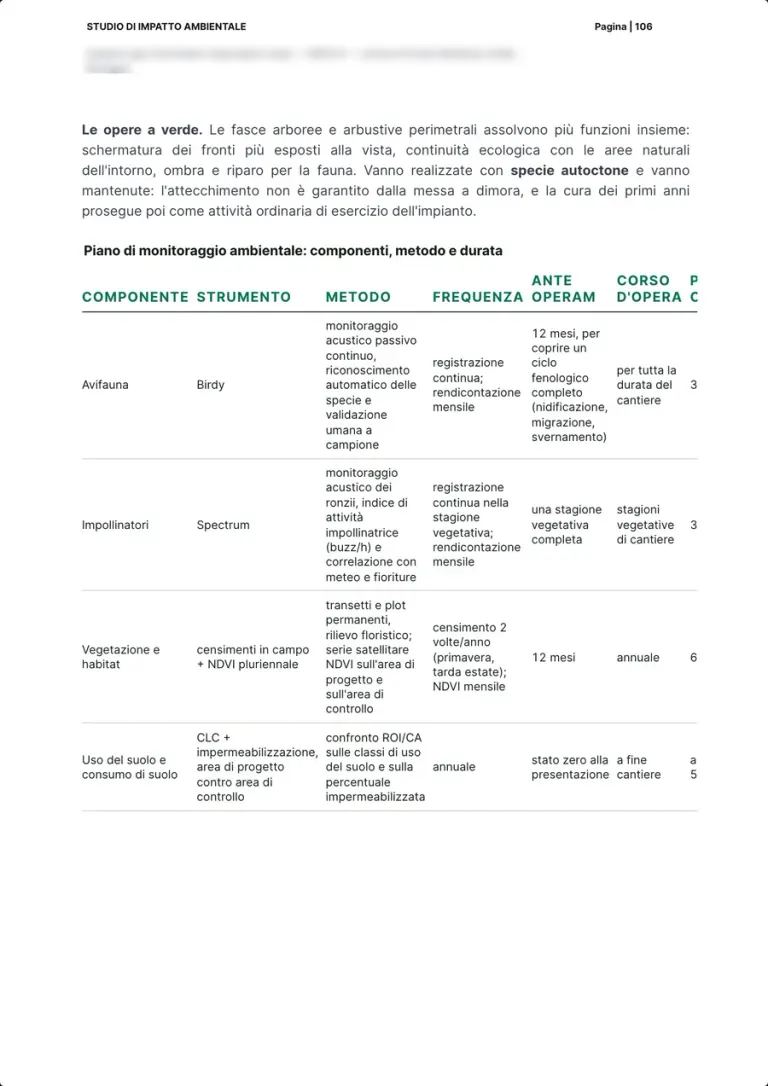
The environmental monitoring plan
- Measured automatically
- Worked out by the expert on our data
What the authority asks for
The mitigation measures and a monitoring plan per component, with methods, frequency and duration.
How we produce it
The plan table per component: tool, method, frequency and duration before, during and after the works; the green works with native species.
Interpreted and signed by Team expert, on the platform's data
Real page · EIA generated with the platform · p. 106/126 Mitigation and monitoring29 / 30
From before to after: the monitoring stages
- Measured automatically
- Worked out by the expert on our data
What the authority asks for
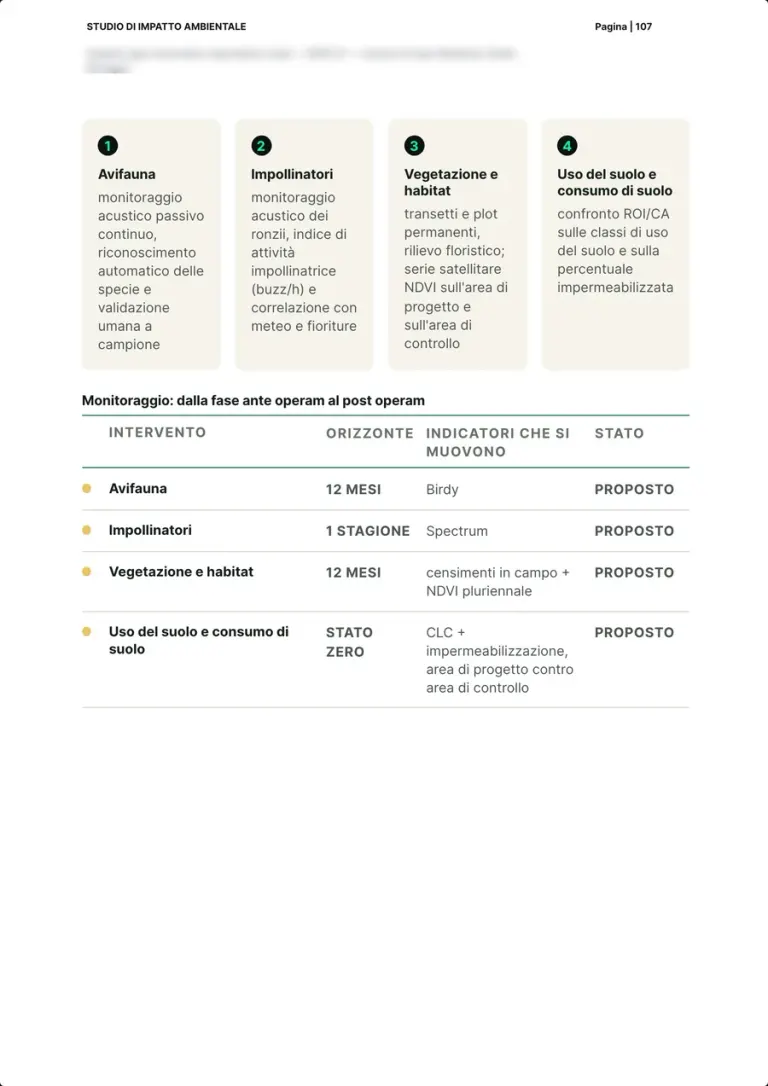
Monitoring must compare before, during and after the works on the same indicators.
How we produce it
Four components, birds, pollinators, vegetation and habitats, land use, each with its tool, horizon and the indicators that move.
Interpreted and signed by Team expert, on the platform's data
Real page · EIA generated with the platform · p. 107/126 Mitigation and monitoring30 / 30
Field sensors and their frequency
- Measured automatically
What the authority asks for
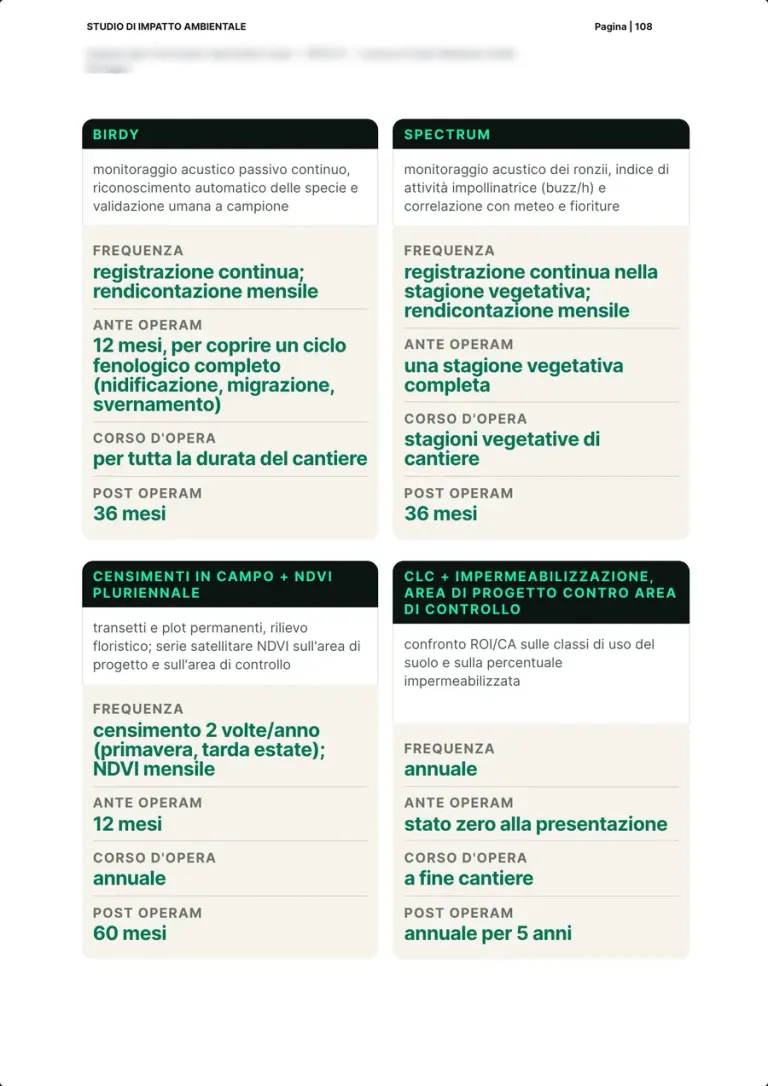
Repeatable monitoring methods, with stated frequencies for each stage.
How we produce it
Birdy records birds continuously, Spectrum the pollinators' buzz; for each stage the frequency, twelve months before the works to cover a full cycle, and automatic recognition with sample human validation.
Interpreted and signed by Platform, with sample human validation
Real page · EIA generated with the platform · p. 108/126
How the maps are made
From satellite to a finished map with its legend.
Every map in the report is computed on the perimeter of your site, with its source, date and legend.
Satellites and datasets
Open imagery and data, updated over time.
XNatura models
Land use, MSA, pollinators, temperatures and risks, including under the IPCC climate scenarios.
150+ layers
Satellite, official maps and models, computed on the same perimeter of the site.
Finished map
Map, legend, scale and source laid out for the report, with the caption the authority expects.
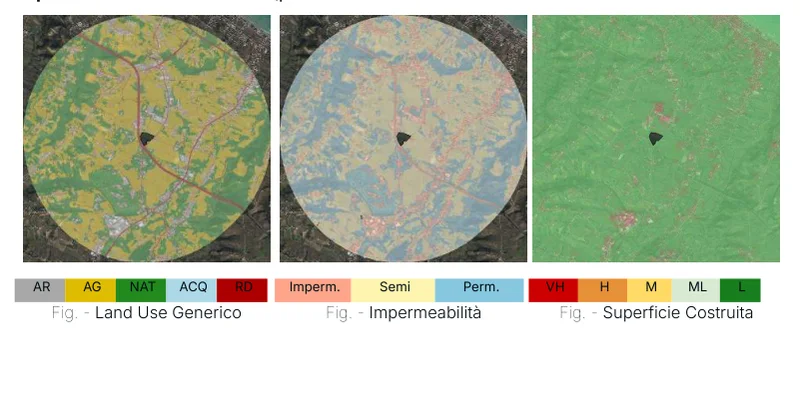
Same area, three layers
Switch the layer, the perimeter stays put.
The three figures come from the example EIA report. Same area, same scale: that is how land use, imperviousness and built-up surface can be compared without redrawing anything.

MSA (Mean Species Abundance) 
Land Use 
PA Relative Pollinator Abundance 
Hydrogeological Risk 
Aridity 
Extreme Events 
Natural Habitat Coverage 
Land Surface Temperature 
Protected Areas 
Built-Up Surface
Indicator cards of the XNatura platform, from the site's Satellite maps page. The platform's satellite maps
In the field with Biodiversa
The satellite says where. The surveyor says what is there.
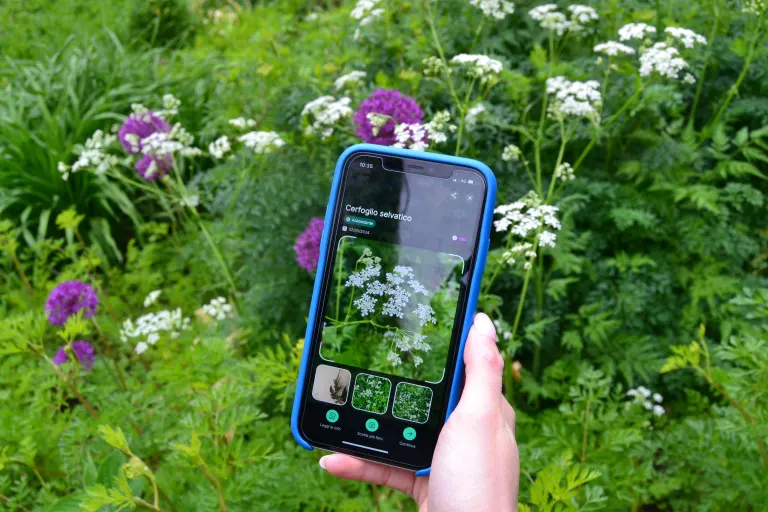
The Biodiversa app guides the surveyor in the field and sends every record, with its photo and position, straight into the report. No sheets to copy out, no photos without coordinates.
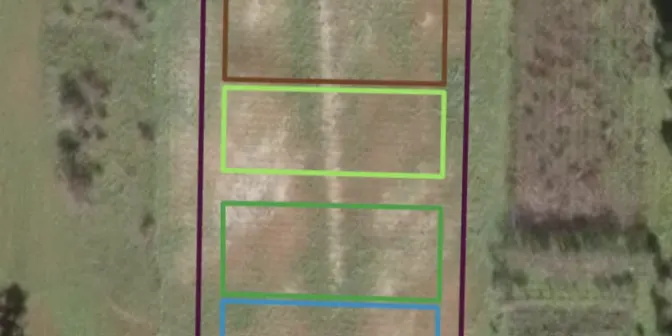
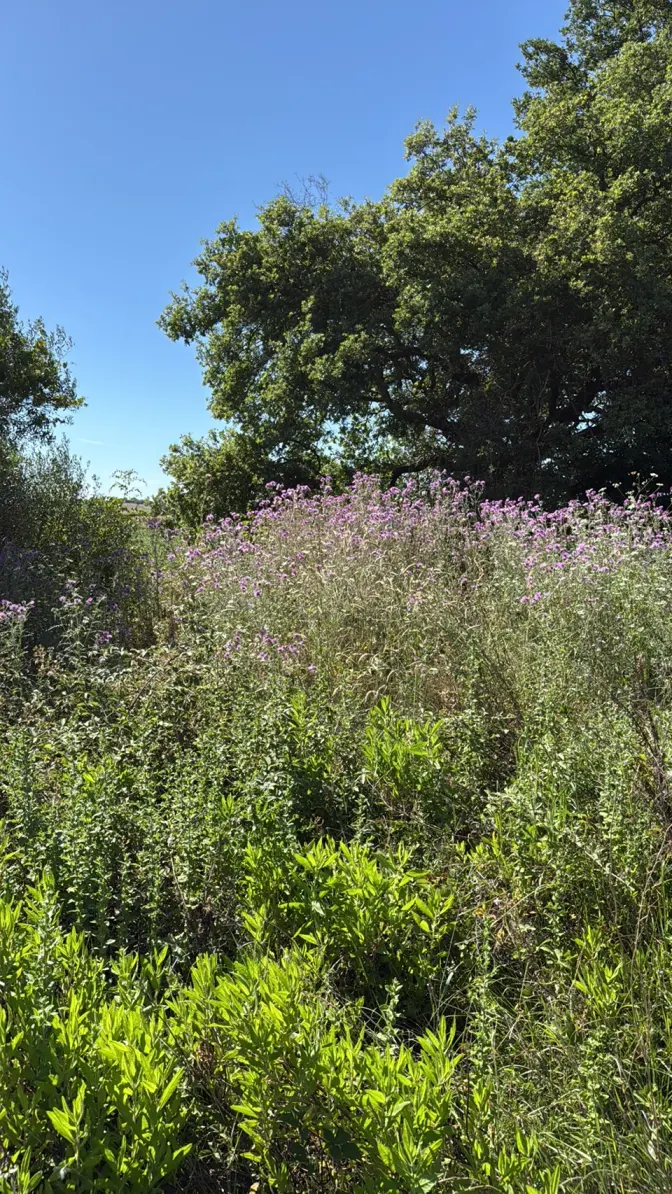
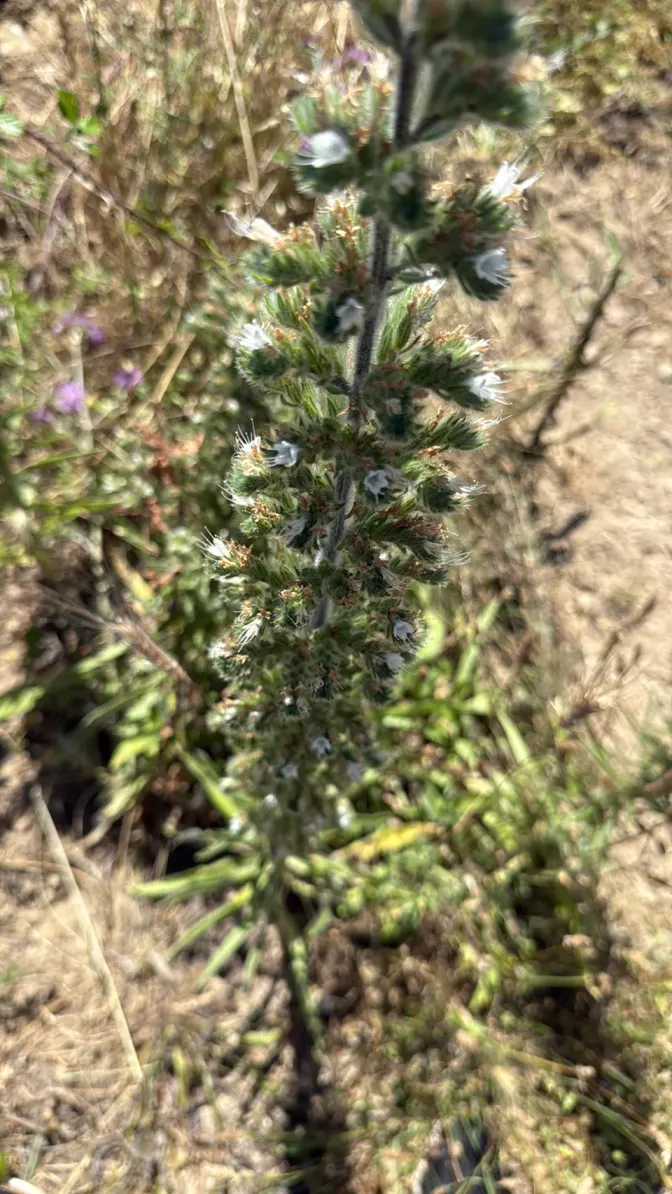
- FieldSurvey with the app
- CheckValidated by the expert
- DataCensus observations
- ReportThe record shows up in the report
The Nature Experts
The platform prepares the data. The expert signs.
An environmental impact study is not an export of maps: someone has to interpret them, take responsibility for every judgement and answer to the authority. A named professional does.
- 01PrepareMaps, indicators and tables from the platform
- 02InterpretThe expert reads the data on the ground and assesses the impacts
- 03SignProfessional responsibility for the document
- 40+in-house nature, climate and ESG specialists
- 7disciplines under one roof
- UNI/PdR 179Italian biodiversity standard, project leader (2025)
Who works on a study
Ecologist
Reads habitats and communities, sets up the surveys, assesses the sensitivity of the site and signs the environmental framework.
Botanist
Flora and vegetation, protected species, pollinators and meadow strips, with verified identifications.
Zoologist
Birds, bats, amphibians and mammals: survey campaigns, bioacoustics, camera traps.
Natura 2000 expert
Habitats and species of the Directive annexes and mitigation measures, in support of the appropriate assessment, site by site.
Study coordinator
The professional who coordinates the document, takes responsibility for it and signs it before the authority.
The team's disciplines
 Ecology & biodiversityBiologists, zoologists, environmental scientists: baselines, surveys, camera traps, bioacoustics, telemetry.
 Assessment, reporting & complianceESRS E4, BNG, SBTN, GRI, EIA/SEA, VIncA, BREEAM/LEED. Board- and authority-ready.
 Agronomy & land useRegenerative agriculture, supply chains, land and vegetation management.
 Data & remote sensingGIS, satellite analysis, IoT data, predictive models, digital twinning.
 Climate & riskIPCC scenarios, physical risk, wildfire and water modelling per asset.
 Strategy & deliveryNature strategy, action plans, green finance, stakeholder engagement, client training.

After the decree: monitoring
The conditions are the beginning, not the end.
71 EIAs in 100 end with conditions. The monitoring plan turns them into repeatable measurements, year after year, with evidence ready for the authority.
Pre-construction
What is measured
- Baseline of flora, birds and pollinators
- Starting land use and natural cover
- Zero point of temperature and hydrology
With which tools
- Biodiversa surveys on transects and pins
- Birdy and Spectrum installed for the season
- Reference satellite maps
What you hand to the authority
- Signed baseline report
- Maps with legend and date
- Protocol and position of the points
Change
What is measured
- Land use with the plant and with the mitigation, in hectares and percent
- Change in MSA and pollinators against pre-construction
- Comparison with the control area
With which tools
- Project layout and plan uploaded to the site (the developer's KML)
- Simulation in three states: no plant, plant, plant with mitigation
- Land use and sealing maps before and after
What you hand to the authority
- Simulation report: baseline, simulation and change of every indicator
- Mitigation sized on the change, with species and areas
- The numeric basis for the impact matrix and the monitoring plan
Construction phase
What is measured
- Disturbance to birds in the breeding season
- Changes in cover and bare soil
- Air quality on the construction site
With which tools
- Birdy for birdsong, continuously
- Sintropy Air air sensors
- Camera traps on wildlife corridors
What you hand to the authority
- Periodic reports on the thresholds met
- Prompt notice of any deviation
- Log of corrective actions
Post-construction
What is measured
- Recovery of vegetation and meadow strips
- Pollinators and birds against the baseline
- Effectiveness of mitigation and compensation
With which tools
- Spectrum for pollinators
- Birdy and camera traps, continuously
- Maps with source and date, compared with the baseline
What you hand to the authority
- Annual report with year-on-year comparisons
- Evidence for each condition
- Data available on the platform
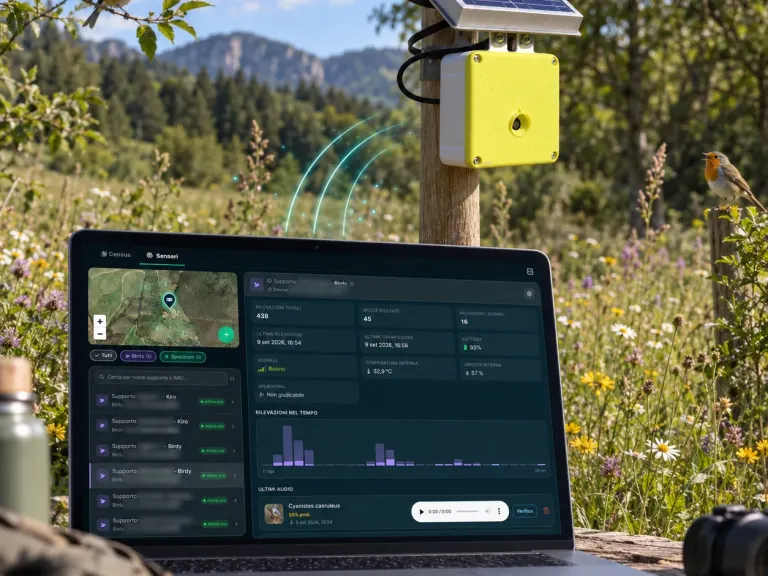 BirdyListens to nature: birds recognised by their song.
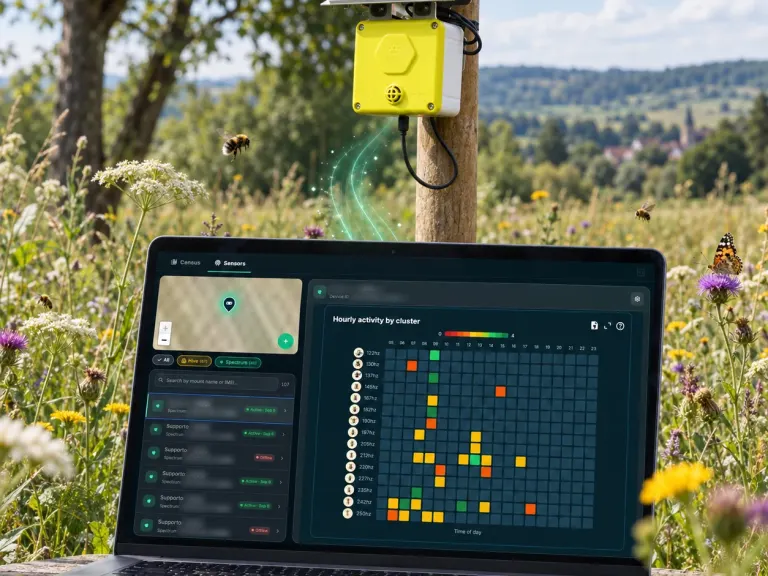 SpectrumCounts pollinators in the field, day by day.
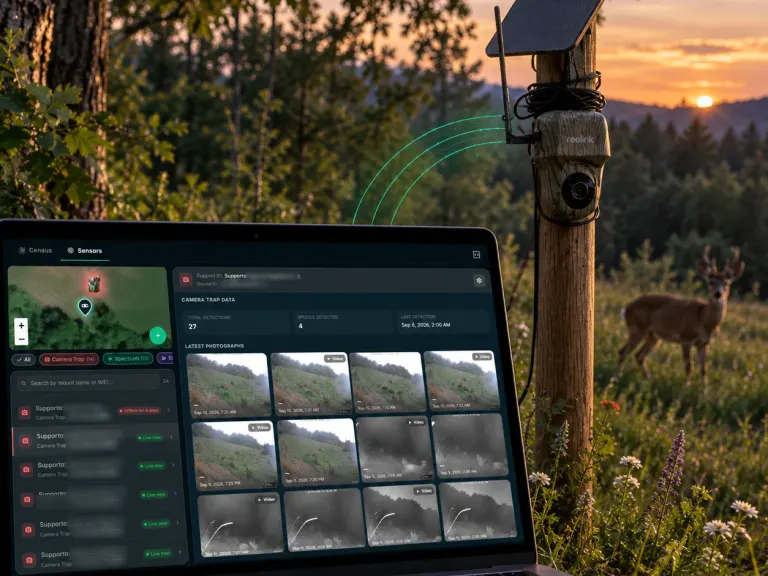 Camera trapsWatch wildlife along corridors and fences.
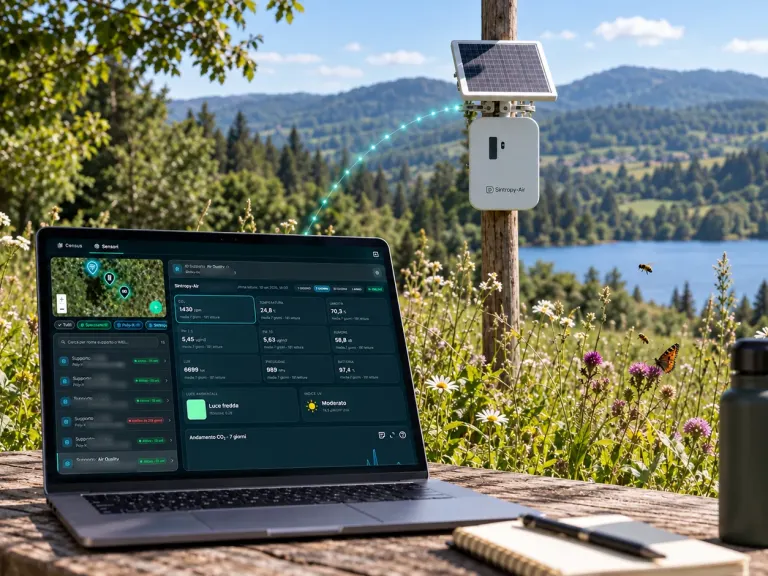 Air sensorsPrecision air quality, on construction sites too.
Maps for the period you need
150+ layers, each with its source and date: maps are generated again for the period the authority asks for, from baseline to post-construction.
Monitoring already public on the site
 TransportationBrebemi
 TransportationCAV
 TransportationGruppo Save
 EnergyCubico
 EnergyRWE
 EnergyEdison Next
- 200+projects
- 12countries on 4 continents
- 10,000+IoT sensors in the field
- 150+layers: satellite, official maps and models
Case studies already public on the site. They are field monitoring projects, not outcomes of EIA procedures.Transportation casesEnergy casesThe field sensors
Example reports
See what you receive: real reports, anonymised
Deliverables our experts signed for real clients, with names, places and coordinates removed. Pick one, leave your details and download the PDF straight away.
Your report is ready.
Open it now; a strategist may follow up if it fits a project of yours.
Download the PDF ↓Our systems are temporarily unreachable and the request did not go through. Try again, or write to info@3bee.com.
The voice that guides you through the report
Ask, and the page takes you there.
A voice assistant always within reach, bottom right. Ask it about a section of the report, a figure or who signs what: it answers and brings the page to the right point.
- It answers about this page: how long an EIA takes, the coverage labels, how we produce each section.
- It walks you through the document: it scrolls to the section and highlights it while you keep talking.
- If you want a first analysis of your site on the platform, it prepares it, and you open it on XNatura after signing in.
You can ask, for example
- Take me to Natura 2000 and protected areas
- How long does a screening take?
- What does the section on noise and vibration cover?
- Who signs the study?
- I'd like a first analysis of my site on the platform
Contact
An EIA or a screening to prepare?
Tell us about the project, the stage and the deadline. A named strategist replies within 24 working hours.
The example reportsReal reports, anonymised: the simulation of a site for an EIA and the answer to the conditions of an appropriate assessment.Choose and download30 minutes with the XNatura team
Video call on Google Meet
Would you rather talk it through?
Either way you are speaking with an AI assistant, and the conversation is transcribed. How we handle your data
Tell us about your project
Request sent.
One of our strategists replies within 24 working hours. If you need us sooner, write to info@3bee.com.
Our systems are temporarily unreachable and the request did not go through. Try again, or write to info@3bee.com.
We could not verify that the request comes from a person, so it was not sent. Reload the page and try again. You can also write to info@3bee.com or call +39 030 204 1767.
FAQ
Frequently asked questions on the EIA
Is XNatura environmental impact assessment software?
It is software and a team. The platform prepares the data of the study: maps of the site from 150+ map layers, field records from the Biodiversa app, and the Report Builder, which lays them out section by section from an EIA template. An expert interprets the data and signs the study: one of our team when we prepare it, or the consultant who leads the EIA, whom we support with the platform and our team, without replacing them.
How long does a state EIA take in Italy?
In the catalogue of the MASE Environmental Assessments portal, the median concluded EIA takes 990 days under the PNIEC-PNRR regime, about 2.7 years, and 1,087 days under the ordinary regime. Only procedures concluded with a start and a decision date are counted: those still open, often the longest, are not.
How many EIAs end with a negative opinion?
Of the 632 EIAs concluded with a known outcome, 21 in 100 were negative, 71 in 100 positive with conditions and 8 in 100 positive without conditions. Measured on 19 October 2026.
How long does an EIA screening take?
The median is 287 days under the ordinary regime and 251 days under the PNIEC-PNRR regime. Of the screenings concluded with a known outcome, 63 in 100 exclude the project from the EIA and 14 in 100 refer it to an EIA.
What do you prepare for an environmental impact study?
The environmental parts of the study: the baseline of the site measured from satellite and in the field (land use, biodiversity, protected areas and nearby Natura 2000 sites, water, climate and risks), the impact assessment, the mitigation and compensation measures and the monitoring plan. Every document is signed by an expert of the team.
Do you also handle the Appropriate Assessment (Natura 2000)?
Yes: we analyse the habitats and species of the Natura 2000 sites near the project and prepare the mitigation measures. Among the example reports you can download is the technical answer to the five conditions of an appropriate assessment for a solar plant.
Where do the numbers on this page come from?
From the "Projects and authorisations" catalogue that XNatura builds on the MASE Environmental Assessments portal and updates every day. Durations and outcomes are measured on concluded procedures, and no statistic is shown for a group of fewer than 10 procedures.
XNatura · AI
Voice assistant
Ask me about a section of the report, a figure from the MASE catalogue or who signs what: I'll take you where you need to be.
You can ask, for example
- Take me to Natura 2000 and protected areas
- How long does a screening take?
- What does the section on noise and vibration cover?
- Who signs the study?
- I'd like a first analysis of my site on the platform
You’ll speak with XNatura’s AI assistant. Your microphone only starts with your permission. You can review and confirm your details before sending a request. If the assistant prepares a demo for you, the site’s name and location go to the XNatura platform, which keeps them for one hour so you can open it. How we use your data
Getting your conversation ready…
The conversation
Start with a question or tell us what you need.
Your project updates as you speak
Review and send your request